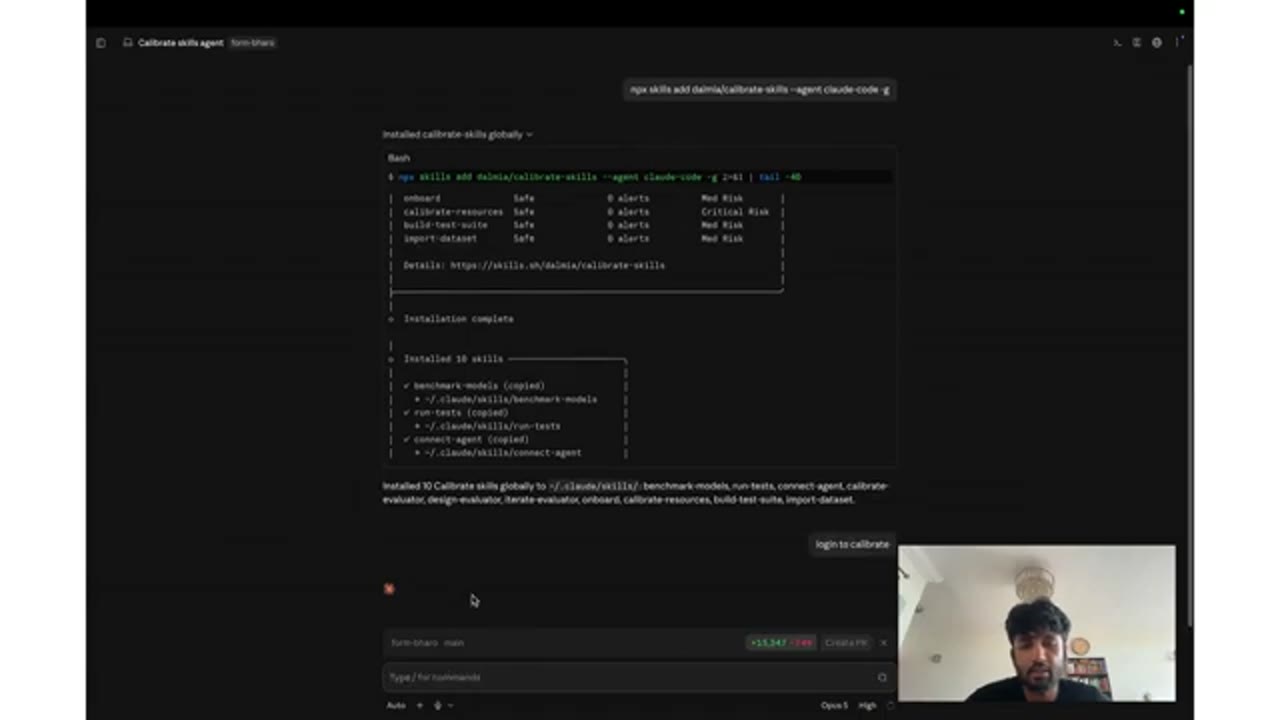
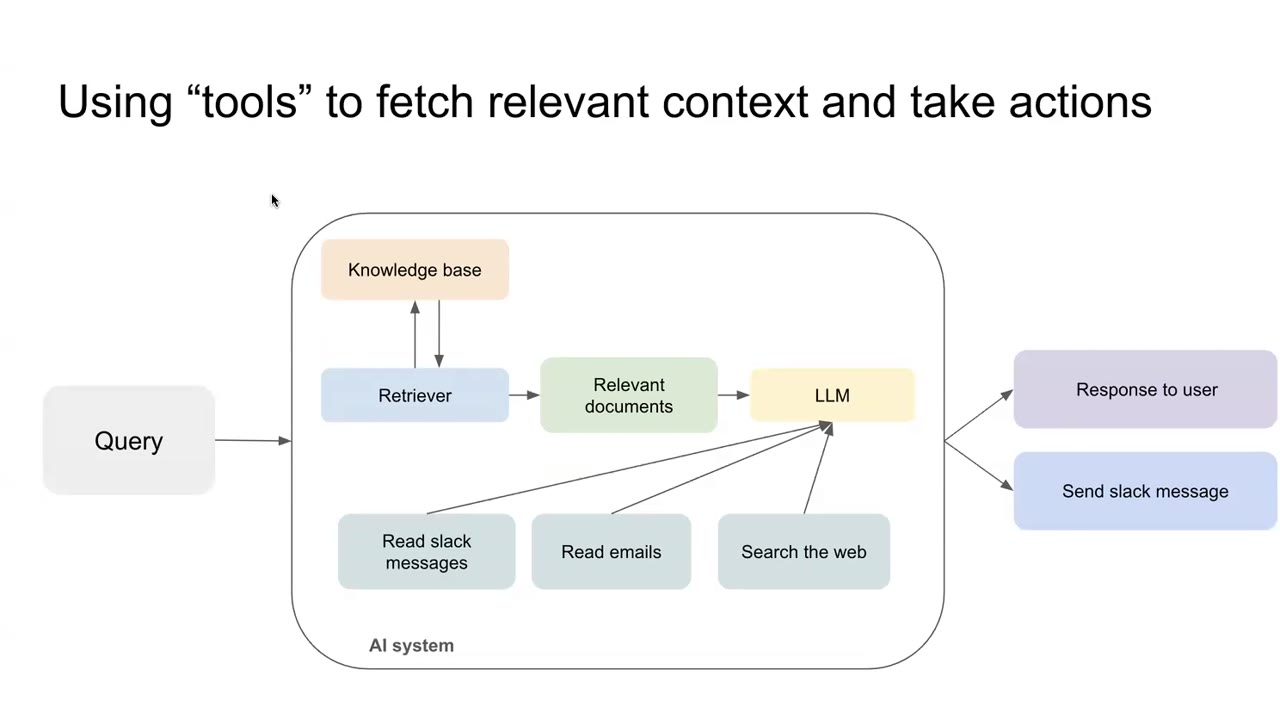
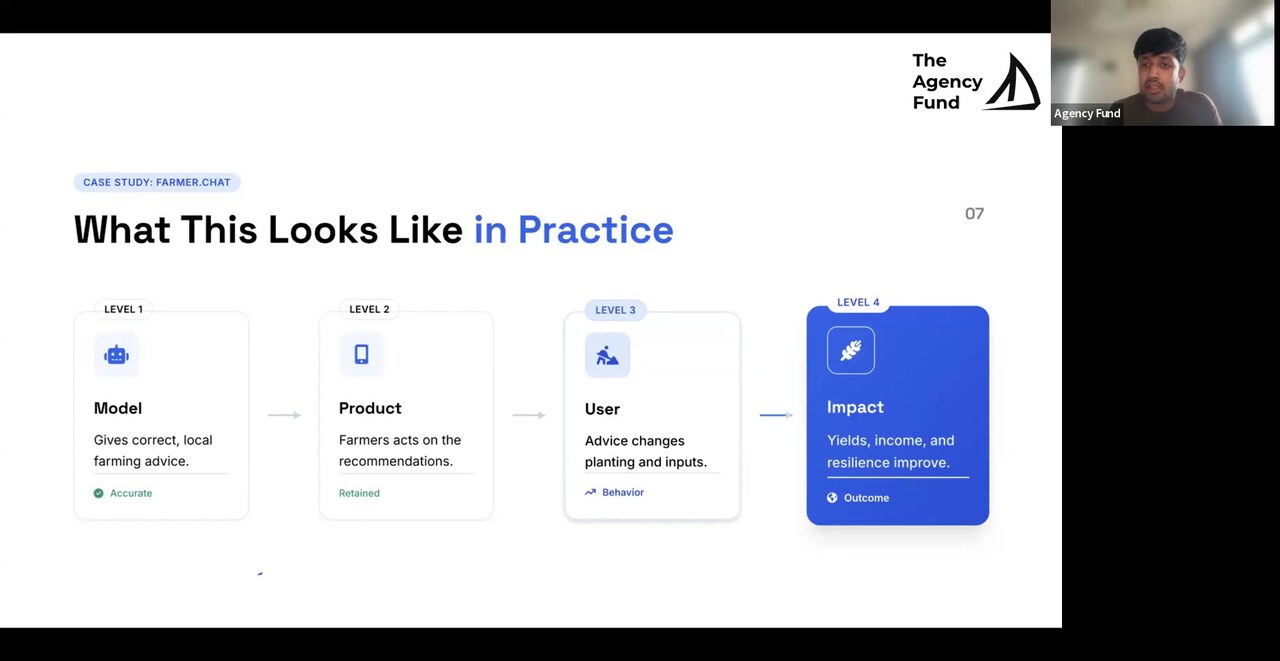
Transcript Copy transcript 0:00 Hi everyone, today I will be giving a demo on the latest version of Calibrate. Let's get started. 0:07 Firstly, what is the problem that we are trying to solve? There are many reasons that AI systems can 0:12 fail your users. They could be trained on biased data. Because they are trained on data from the 0:17 internet, it can have all sorts of misinformation, unverified claims, and typically a bunch of the 0:21 data that it is trained on comes from the western world, and so it may not be applicable to your 0:25 context, your use case, specifically in the social sector. Most of the internet is filled 0:31 with a few dominant languages, and it is in fact known to perform poorly in what we call low 0:36 resource languages, which are essentially languages not represented adequately on the internet data. 0:42 These models also tend to have a knowledge cutoff, which is they are trained on data until a 0:46 particular date, so inherently they don't know events that are happening in the world real time, 0:51 and of course they don't have access to your local context, what you think is right, how you 0:56 operate, what are your guidelines, and depending on the model and how strong it is, it may or may 1:03 not follow the instructions that you have given them properly. And beyond the model failing, 1:08 there could be mistakes that you might be making as well. Your instructions may be vague or confusing, 1:14 it could be incomplete, we may not be making the best use of the full capability of the model, 1:19 and even if these models are working well, it may be too costly and too slow for you to deploy. 1:24 And there are many other failure modes, but these are the dominant ones. So we took a poll 1:29 asking people, asking non-profits, how do they currently know if their AI is working properly. 1:36 Most of them said that they are just manually checking a few samples, or they don't have the 1:40 capacity for evaluating AI responses, and some of them don't even know how to do it. And to identify 1:48 if something is wrong today, they just mostly do manual checks. But manual testing does not work. 1:54 It is great to get you started or to launch it with a small set of people, but as you scale, 1:59 as you start getting real users, it is just not reliable. Suppose you want to fix a particular bug 2:05 and you make the change, you test that the particular bug is solved, but how do you know 2:10 if you didn't introduce a new bug, or you broke something that was already working. 2:15 It is also incredibly slow to just go through 20-50 samples every time before you want to deploy 2:20 any change. And that is why it is not scalable. Assuming that you keep growing your list of 2:26 edge cases to test, you cannot keep testing your change on every single edge case manually before 2:31 you deploy. And often these edge cases and mistakes or failure modes are not documented anywhere. 2:38 It is just in the minds of different people or different team members who might have a particular 2:41 set of edge cases in mind whenever they test the model to identify if there are any new bugs. 2:46 But there is no structured way of documenting these edge cases in a single place. 2:51 The goal for evaluation or the vision is to have a simple and repeatable process for finding errors. 2:57 You should be able to deploy your changes confidently without breaking something that 3:01 already works. The simplicity of evaluation should hold as you scale and you must get real-time 3:07 visibility of what's breaking in production without waiting on users to respond and report 3:13 an error. Because these are highly sensitive domains and require domain expertise to know 3:18 the nuances of what is good and what is not good, domain experts need to play a central role in AI 3:23 evals. But because of how organizations are structured and evals falling primarily on 3:30 engineers, there is a massive friction in enabling domain experts to engage itself on AI evals, which 3:37 is a big miss. They need to take the lead here. Finally, you want to focus on improving your 3:41 product. You don't want to keep rebuilding the evaluation harness around it. This is why we 3:46 built Calibrate. It's an open source platform for evaluating AI agents specifically built for the 3:52 challenges that non-profits face. Let's see how it works. So we will take the case study of a form 3:57 filling voice agent to understand this more. Essentially, the problem is that forms are a big 4:02 part of the public health system in India and a lot of the users that we intend to reach are 4:07 digitally illiterate. So they often need a health worker to speak to them and fill these forms. But 4:12 these workers are already pretty stretched. Can we have a voice agent that directly speaks to 4:16 the user and fills the form by asking them questions one at a time? Let's look at this demo. 4:25 It's asking for the name of the user. 4:32 Now it's asking for the district that the user belongs in. 4:37 This is for a particular form that we are deploying with Armaan in rural Maharashtra. 4:44 But you understand the idea that there are different form fields that need to be filled. 4:49 The voice agent speaks to the user, asks questions one at a time, and depending on their answer, 4:54 the form gets filled. Broadly, this is how it works. We have a speech-to-text model that 4:59 transcribes what the user has said. Then one LLM extracts the form data from the transcript. So if 5:05 I said my name is Aman Dalmia, it extracts name equal to Aman Dalmia. Then it goes through a few 5:12 rule-based steps to decide what needs to be asked next. And then another LLM generates the message 5:18 that must be spoken to the user. So for example, you heard the agents saying what is your name, 5:24 what is your district. So LLM2 produces the text, which is then converted to speech using a text-to- 5:30 speech model. So transcription, extraction of the form data, generating what should be spoken to 5:35 the user, and then actually speaking it out. Now there are many failure modes, and I've just 5:39 captured a small set here. For example, speech-to-text might fail because of background noise. 5:43 There could be multiple speakers speaking in the background, and the transcription accuracy 5:47 might be low for low resource languages, as I highlighted before. The LLM responsible for 5:52 extracting the data might extract the wrong data based on the transcript. It may end up inputting 5:58 invalid data into the database. For example, if someone responded to a question on date without 6:03 the year, it may choose to capture it and save it to the form, even though it is invalid. And the 6:08 LLM that is generating the response to be sent to the user, it may ask a question that it shouldn't 6:14 have asked. It may skip a mandatory question if the user chooses to not respond. It may respond 6:20 English to a Hindi user. So there are many failure modes here, and so let's see how can we test it. 6:26 Within Calibrate, we define each edge case or each failure mode as a test. This is similar to 6:32 the tests that we have built within software engineering all this while, but modified for 6:38 agents. Let's see what one test case looks like. On the right side, we see the conversation history 6:46 that the agent receives as input. If you don't have an agent that has a conversation and it just 6:52 responds based on one input and gives one output, you can just delete these other two messages. It 6:58 can be a single user message. But in my case, since the agent has a conversation with the user, 7:04 the input is often a conversation. So here I am simulating the situation where the user said hi, 7:09 the agent asked the name and the user gave their name. This is for the same form that I demoed 7:14 before. And so I have given a criteria here which states that the agent should ask the next district 7:20 question. OK, let's see how this works. The input that you saw on the right hand side is sent to my 7:28 agent. The response that the agent generates is sent to an LLM judge which was given this criteria 7:36 to verify against the response. What is an LLM judge? For us to evaluate an open ended response 7:42 like this, it's a string, right? There is no objective way to say if this is correct or not. 7:48 One needs to interpret this. So, we use a stronger more powerful LLM that receives this conversation, 7:56 the agent's output and the criteria that you defined to verify if the agent's response 8:02 met this criteria. OK, and you can this LLM judge is completely in your control. 8:08 So, you can decide the prompt, you can decide which model you want to use for judging, you can 8:13 decide what the output looks like. Is it binary? Is it a rating scale? It's your choice. And as you 8:19 want to update it, you can just click on new version and you can keep updating the prompt 8:25 or choosing a different model. For example, it is completely in your control. So, that is how 8:31 one test case works. In this case, it passed. The agent's response is apne zile ka naam pata hai, 8:36 which means what is the name of your district. Now, let's look at a different test case. 8:41 This test case builds on the previous one. So, the agent did ask the district it and the user 8:46 said I don't know. Assuming that the agent received this as input, how should my agent 8:50 have responded? This is me defining what good means like for my context. So, here I am saying 8:56 that the agent should have skipped the district question and it should have gone to the next 9:01 new question. So, let's run this test now. The same process happens. The input is sent to the 9:07 agent. The agent gives a response. The LLM judge reviews the response and this time we can see 9:12 that it didn't pass. So, you can see that the agent still asked what is the name of your district, 9:18 which clearly doesn't match my criteria. So, this way when someone reports a mistake or a 9:24 user reports a mistake or a team member finds a mistake, documenting it here helps us reproduce 9:29 that. So, that in the future when we make a change, we can go back and run this test 9:34 and verify that our change has worked and the error has been fixed. That is just the first 9:39 implication. Now, there are many dimensions that I want to check about this response. Checking that 9:46 it asked the right question is just one dimension. I also want to ensure that the response is in 9:51 Hindi. What if it was in English? What if it asked the right question but in English? That also 9:55 wouldn't work. Similarly, you can see that the responses here are short. That is intentional as 9:59 well. We don't want an agent to give like a three-line response. So, there are different 10:03 dimensions about this response that I care about. I could put all of those dimensions within the 10:08 criteria here, but the problem is that I will not be able to know which criteria is failing 10:14 if a test case fails and I would have to open every single conversation. I would have to read 10:18 the reasoning for every single one of them to figure that out. So, instead of that, it is better 10:25 to add another dimension of evaluation. In this case, I wanted to check if it is concise and I 10:31 want to check if the response is in Hindi. So, these are two other LLM judges that I have already 10:35 defined which I will add to this test and I can run this now. Now, the same process follows but 10:41 instead of a single LLM judge as before, there are three LLM judges, both checking for their 10:47 own criteria and you can see that now the agent actually passed two of the dimensions. It was in 10:54 Hindi and it was concise. So, when a test case fails, this gives me a very clear way of identifying 11:02 where the source of error is without having to read the conversation 11:06 or read the reasoning for every single one of them. 11:09 Now, how does this grow? As I said, we can keep thinking of all the edge cases that the agents 11:15 might encounter, where it could fail and the actual failures that was encountered when the 11:21 agent spoke to real users and the users reported a complaint. We keep getting data on where the 11:27 agents might fail or is already failing. Instead of keeping it in our head or spread across multiple 11:31 sheets, bringing it here, converting it to a test case, defining the success criteria, 11:37 helps us reproduce the error and helps us grow this set in a structured way so that we have a 11:43 history of all failure modes in one place. And as you can see, it is very simple for anyone to 11:49 add it. So, for example, if I create a new test, I can just come and input it here. I don't need 11:56 any technical knowledge. I don't need to know engineering. And so, domain experts can very 12:01 easily come and create test cases for what they want to check about the agent. 12:09 Now, as you can see, over time, I have accumulated more than 400 tests here. Each of them are 12:14 covering different scenarios, multi-turn conversations, long conversations, short 12:19 conversations. But each of them carries the criteria that I want to check for every single 12:26 edge case. And I know a lot of people might ask, how do we create these edge cases, these tests? 12:32 And I will cover that as well. For now, the entire goal is assuming that you have, 12:36 you're already maintaining everything somewhere else in a manual process. Instead of doing that 12:41 or keeping it in your head, just bring them here. The benefit of doing that is when I run these 12:46 tests, I get a high level score of how good the model is currently performing. So, for example, 12:52 the pass rate here tells me how many of my test cases are passing. So, if I go to my outputs, 12:59 I can see that out of 500, 493 are passing, but seven are failing. And I can go and inspect where 13:04 each of the seven is failing. I can look at the reasoning. But before that, the overall idea is 13:11 that I know how good my model is now. And when I deploy a new change because of, for example, 13:17 trying to fix a particular issue that a user encountered, I don't check just that particular 13:21 use case. I check everything that I have accumulated so far. And I will not deploy the 13:26 model if it is not at least as good as 98.6%. So, this gives me an objective way to ensure that my 13:34 model is always getting better and never introducing any regressions. Now, this overall 13:40 pass rate you can see is broken into multiple dimensions. This is another benefit of separating 13:45 your criteria. So, whenever you think that you have multiple criteria that you want to evaluate 13:50 the response on and they are significantly independent of each other, it's better to create 13:56 them as separate dimensions. So, I can see that this 98.6% translates to the correctness criteria 14:02 actually being 100%. And there are some other LLM judges which are not 100%. At this point, 14:08 I can take a call on whether I really need to push these towards 100% or is it OK? Is it worth 14:14 the effort to pursue making it 100%? I might be OK with 98.6, right? So, it gives you like 14:20 breaking the evaluation across these dimensions, helps you make those choices explicitly. Now, 14:26 beyond the pass rate, which represents quality, I also get the latency and cost. Let's see where 14:32 this is used. Because Calibrate is model agnostic, we help you compare across all the models that are 14:40 out there, open source, closed source. This gives you a clear way of comparing these different 14:45 models for your use case on your dataset. You can see that there is a leaderboard across the pass 14:51 rate, which is the quality and also on the latency and the cost. This way, you can make a thoughtful 14:58 decision about which model is actually deployable. If a model is 1% better, but 10x more costly or 15:03 10 times slower, is it really deployable for your context? What do we lose when we go to a smaller 15:08 model? What do we gain by going to a bigger model? This helps you make that decision concrete. 15:13 To further help you select the best model, we let you encode your priorities. So, for example, 15:19 if quality, cost and latency mattered equally for me, you can see each of them have a weightage of 15:26 33%. I get a particular leaderboard. But if quality matters to me more than others, or latency 15:34 matters to me more, or cost matters to me more, then you can see that my leaderboard is changing 15:39 to reflect that priority. And again, if I change back to quality being the most important, then 15:45 the leaderboard changes. This way, I can encode my priorities, my deployment priorities and use that 15:51 to select the best model for my use case, instead of going by my gut. Now, let us go back to the 15:59 500 test results. Here, you can see that there are seven failures. Now, many people have said, 16:04 what do we do with these eval numbers? What does this 98.6% mean? How do I make it actionable? 16:11 Now, the naive way would be to go through them, look at the reasoning, try to figure out where 16:16 it is going wrong, and then figure out what to change in your agent's prompt or knowledge base or 16:21 the way your agent works. But this does not scale. And as I said, an important criteria of success for 16:27 an evaluation platform is to keep things scalable, right? So, because of that, we have added support 16:34 in Calibrate to connect with any AI tool of your choice. So, you can essentially install 16:43 our Calibrate skills and it will work with Claude Code or Cursor or Codex or whatever else that you 16:50 use to pull this data out from Calibrate, analyze it, compare it with your code base, give concrete 16:56 suggestions on what you need to change, and it can also push those changes back to Calibrate so 17:02 that you can interact with it without ever using the browser itself or the UI. You can just stay 17:08 within Claude Code and do everything. Let's see how this works. Here, you can see I asked Claude 17:16 Code, once I have made the connection, on what are the mistakes. Out of the 500 mistakes, it 17:22 correctly identified that seven of them failed. Among these seven, it found that the main mistake 17:28 was that my agent was repeating its response two times and that broke multiple LLM judges. 17:36 And the final one, the seventh one, was actually correct. The model gave the right output, but the 17:44 judge responded incorrectly. And so, it can give me what was the core issue. It can tell me what 17:50 needs to be fixed in my agent, making evals actionable for me now. It is not just a number 17:57 that is present somewhere. I can dig into these errors and identify what needs to be fixed. 18:02 Back to my agent now, another problem that often arises is because we are using an LLM to judge the 18:09 response, this LLM itself could be wrong, right? Because at the end, it is also an LLM and it also 18:15 needs to be evaluated. So, whenever you find that there are any mistakes or you want humans to have 18:20 a second opinion on this, you can submit whatever roles you want a human to review and you can 18:26 submit it for labeling. You can submit it for existing labeling task or you can create a new 18:33 review task, for example. When you open them, you can see each of the samples from your test 18:40 have been added here for human review. Now, typically, when non-profits collect human 18:48 feedback, they often do it on a sheet which looks something like this. So, you have the input, 18:53 the output and then you have one column for each annotator. The problem with this is that 18:58 annotator 2 now can see what annotator 1 gave, introducing bias into the process. And so, 19:04 these annotators did not actually annotate independently. To address that problem, 19:09 we have added support for creating labeling jobs for each of the annotators within Calibrate 19:17 itself. When you do that, there is a unique link that is created for each annotator. And 19:24 when they open this link, they do not get to see what others have added. They are just shown all 19:28 the tasks that they are supposed to perform. So, for example, for this question, I need to fill 19:33 these fields and given my feedback and I can come back and as a second reviewer, I can go and 19:42 annotate again. And once I have gathered multiple annotations, I can see a score of agreement 19:52 between my human raters themselves. So, my human raters in this particular case are themselves 19:58 not 100 percent aligned, right? 20:00 Before I can make my LLM judge reliable, I need to go back and ensure that my annotators, 20:06 my experts themselves agree on what good looks like. 20:10 But assuming that you've done it on the same dataset, I can run my LLM judge as well. 20:16 And when I do that, you can see that I am getting a score of a human agreement for my 20:24 LLM judge. 20:25 So for each of the responses, I can see what my LLM judge gave, what one annotator gave, 20:30 what a different annotator gave, and I can look at just the disagreements, for example. 20:36 But I have a concrete quantified way to know how much does my LLM judge agree with my human 20:42 experts. 20:43 At this point, again, you can go and read the reasoning given by the humans, given by 20:47 the LLM judge, and figure out what is going wrong. 20:50 But that is not scalable. 20:52 And back to our promise, this is again connectable to Claude, where Claude can analyze these 20:57 disagreements and come up with what needs to be done next. 21:01 Now I can just tell Claude what are the sources of the disagreement here, and it correctly 21:06 identified that it currently disagrees on three rows, and it found the pattern. 21:12 There was a particular root cause where the humans caught the edge case properly, but 21:16 the LLM judge currently does not handle that edge case. 21:20 And not only did it identify the root cause, it also told me how to fix it, how to update 21:27 the prompt, and it is offering to go and update the prompt on my behalf. 21:32 And I can just say, yeah, okay, go ahead, create a new version. 21:37 You can see that it created a v2 of the prompt. 21:39 So the v1 is the initial prompt that gave me the 67% number, which looked like this. 21:46 But the newer one has this extra line to account for the mistake found during the alignment 21:52 process. 21:53 And let's see how this performs now. 21:56 When I run an evaluation run with this second version, I can see that it is now 100% aligned 22:02 to humans. 22:03 So this way, I started off with an LLM judge. 22:06 It was good. 22:07 In some cases, it didn't perform properly. 22:09 In some other cases, we used Claude to analyze the mistakes, to come up with what needs to 22:13 be changed, which it did on its own. 22:16 And then it can run the evaluation also and give me the final score. 22:20 And in this case, the score has improved. 22:22 The idea is that over time, through these iterations, we want to keep increasing our 22:27 agreement with humans, right? 22:29 So that once I have LLM judges, which I can rely, I can use them for automatically monitoring 22:34 all my responses. 22:35 And I can trust that its judgment will be correct. 22:38 We saw how to evaluate open ended responses. 22:41 But we also use LLMs for generating structured outputs or producing tool calls. 22:45 Let's see how we can evaluate that as well. 22:48 So in this case, there is a conversation that happened and the user gave their WhatsApp 22:53 number, for example. 22:54 And here I can compare now that the WhatsApp number field should be exactly this. 23:01 And so this comparison is just an exact match. 23:03 It is not an LLM based match. 23:06 So within Calibrate, you can do both open ended LLM judge based evaluations, but also 23:12 these deterministic evaluations. 23:14 So think of retrieval. 23:16 You can send all the retrieved documents as a tool call. 23:18 You can send classification results. 23:20 You can send extracted data values, all of them back as tool calls and evaluate them 23:25 this way using exact match. 23:27 But also you could use an LLM judge based criteria here as well. 23:32 And when I run this test, you can see that my agent produced this output and the value 23:39 of pregnant or not is false, which matches the expected value that I had set. 23:45 And for this field, I had given a criteria to be followed and this criteria is marked 23:51 as satisfied as well. 23:53 So you can see a mix of both LLM based checks and deterministic checks. 23:59 Everything that you saw so far was creating evaluation data sets separately or domain 24:05 experts coming here, bringing their set or you pulling out data from your production 24:10 and then uploading these tests here. 24:13 But we have also added support for traces. 24:17 Essentially here, you can connect Calibrate with your production agent and whatever inputs 24:24 and outputs it is receiving and producing, they automatically get captured within Calibrate. 24:30 So let's see how that works. 24:31 First, you need to create an API key. 24:34 You can create a new one if you don't have it or you can use an existing key. 24:38 Then you can add this code snippet to your agent, which just captures a few things like 24:43 the ID of this agent. 24:44 It captures the input that it received for every single call and the output it produced. 24:51 Once you have added in and users start talking to your agents, you will start seeing those 24:57 conversation live within Calibrate. 25:01 So these are live production traces coming here. 25:03 Now the benefit of this is that you can review them, you can identify if something is wrong 25:09 and in the future iteration, we will run your LLM judges to identify where it is not working 25:14 and suggest which ones need to be converted to tests. 25:17 But until then, you can choose which ones are wrong or where the agent has not worked 25:23 well or your domain experts can go through them and flag the ones which are wrong. 25:28 And they can directly be added to your tests from here. 25:35 This way, you don't have to come and create everything manually. 25:39 Everything comes from your production agent. 25:41 You review them and as I said, we will support reviewing it automatically through your aligned 25:45 LLM judges as well in the near future. 25:49 And then create these tests, not just tests, you can also submit them for human review. 25:55 So you can again add it to an existing task or you can create a new task. 26:01 Similar to before, these are shown to humans who can give their feedback, they can again 26:04 be used to keep aligning your LLM judges. 26:07 So not just as a one time activity, but as a recurring activity. 26:10 There's a lot more that we are going to build within tracing, better sampling, proactively 26:15 identifying issues, but that comes later. 26:18 So this is how we are connecting what we call offline evaluation. 26:24 So creating these evaluation sets before you deploy something to put in the right guardrails 26:28 to get sufficient confidence to deploy and then continuing to evaluate your agent once 26:33 it goes live. 26:35 And that is the full loop. 26:36 You build something, you evaluate like it is good enough, then you deploy it, then you 26:40 continue monitoring it, monitoring how it is performing in production. 26:43 Identify the mistakes, convert them into tests, connect it with Claude, identify the mistakes, 26:48 update your prompt, run it on the entire set, ensure that your change is better than what 26:52 you had deployed before. 26:54 Then submit it for human review, ensure that the LLM judges that you are using are aligned 26:58 with your human experts so that they are still trustworthy. 27:02 And then you deploy a change and continue the cycle. 27:07 So that is the core feature or core loop that we wanted to show that Calibrate enables for 27:12 your teams. 27:13 And as you can see, there is nothing here beyond connecting the traces to the code base 27:17 that requires engineering support. 27:19 The domain experts can lead this process end to end. 27:24 Now let's see how other components can be evaluated. 27:28 Similar to LLMs, now we can evaluate speech to text within Calibrate as well. 27:32 So we don't care about a particular provider, we are vendor agnostic. 27:36 So you can come and create a data set or use an existing data set, select which language 27:41 you want to evaluate in. 27:43 So depending on the language that you evaluate, we filter down the models to the models that 27:48 support that language. 27:49 OK, so you don't have to go through the hassle of identifying that from their docs, for example. 27:56 And then you can run the evaluation here. 28:00 Instead of just word error rate and character error rate, which are typically used, we use 28:04 LLM based evaluation metrics as well, which compare the meaning of the predicted and referenced 28:11 transcripts. 28:12 You can learn more from this blog post by Sarvam on why evaluating Indian language ASR 28:19 requires LLM based inferences and it is not just applicable to Indian languages. 28:24 For example, if you have the word 9 and your reference transcript says NINE, but your prediction 28:28 says the number 9, they mean the same thing, right? 28:31 But word error rate, which just operates on comparing character by character, word by 28:35 word, it will consider it a mistake, even though it is not. 28:40 So we account for that here. 28:42 And then you run the evaluation, you can compare different models across all these different 28:48 metrics, quality metrics and latency and cost. 28:54 And you get leaderboards across latency, cost and each of the quality metrics. 28:58 Now, depending on your use case, you can choose which quality metric resonates with you more. 29:04 So we have details on every single quality metric here. 29:07 What it means, what it indicates, where it comes from, and you can read more about each 29:11 of them. 29:13 And we also help you select the right model for your use case. 29:19 So depending on which quality metric you care about, the best model is given to you. 29:24 You can also look at all the other models, but if there are any models which are clearly 29:29 the best, they are automatically highlighted for you. 29:33 And you can choose which quality metric you care about. 29:36 Depending on that, the best model might change. 29:41 This way, again, we help you take a call on identifying a deployable model across latency, 29:47 cost and accuracy. 29:49 So this is quality, this is cost, and the size of the bubble represents the latency. 29:56 Finally, you can also go to the outputs for each model and actually review them step by 30:03 step. 30:04 So you can see what happened for this audio, you can listen to it. 30:07 You can look at the prediction, you can look at the LLM judge reasoning. 30:11 And if you don't agree with it, you can again submit them for human labeling as we did for 30:16 LLMs. 30:17 Similarly, you can also compare text-to-speech models. 30:22 So when you select a new evaluation, you enter all the texts that you want spoken. 30:28 Here I'll just use an existing dataset. 30:29 And again, you can filter down the models based on the language that you care about 30:33 and select different models. 30:36 And we also let you define particular criteria that you care about. 30:42 So in this case, I care about the generated speech, pronouncing the text properly. 30:48 And this is just an LLM judge, which you can define, you can tweak and improve on your 30:53 own. 30:54 So let's see how it performs. 30:55 Here, I can get a comparison across the quality score that I care about, which is pronunciation 31:00 and the latency. 31:03 And I can go back and hear every single generated audio. 31:08 Clearly, that was not that well. 31:09 And I can look at the reasoning for why a particular generated audio passed or failed. 31:19 So in this case, for example, the LLM judge picked that it sounds as amen as opposed to 31:25 aman. 31:27 And we can add other evaluation judges as well. 31:29 For example, whether the generated audio sounds natural or robotic. 31:34 And if I don't agree with it, I can again submit it for human labeling, get expert feedback, 31:39 use that to align my LLM judges as shown before. 31:43 Now we have seen how to evaluate components one by one, but your agent works by combining 31:48 these components. 31:49 Right. 31:50 And so we also need to evaluate the agent end to end, because the way these components 31:55 interact with each other is what will determine whether the agent works as a whole. 32:00 Let's see how we can do that. 32:01 So we can create these simulated personas within Calibrate. 32:05 These are essentially simulated users who will talk to your agent. 32:09 And each simulated user can carry a persona. 32:12 Typically, this should match the different user personas that actually talk to your agent. 32:16 You can see that I can define the gender of the user, their language and their sensitivity 32:21 to interruption. 32:22 So there are often users who are patient and will hear you out or users who are very impatient 32:26 and might keep interrupting you. 32:28 So you can add that sensitivity here as well. 32:32 Then you can define scenarios. 32:33 So these are tasks that the simulated user is performing. 32:37 Why is the simulated user calling the agent? 32:39 So you can define the scenario here, what the persona should do. 32:45 And finally, you can create a simulation where you have selected your agent, the personas 32:49 that you care about, the user scenarios that you want to test, and then define the metrics. 32:55 These are essentially, again, LLM judges, which will evaluate how the agent performs 33:00 throughout the conversation. 33:01 And then you can launch a voice simulation or just a text simulation, depending on what 33:05 you want to check. 33:06 I have launched a voice simulation, and you can see that I can see a conversation between 33:11 my simulated user and the agent. 33:15 And I can listen to this conversation. 33:19 This way, I can see how the agent would respond if different user personas contacted it and 33:26 spoke to it in different ways for different tasks. 33:29 So this is a way for me to proactively see how the agent would perform. 33:33 And using the LLM judges, I get an overall score for how my agent performed in each conversation, 33:40 and then a summary across all the simulated conversations. 33:44 Before we close it out, let's discuss how can we create this evaluation set. 33:48 Now, there are many ways to do that. 33:51 Your domain experts can come and create them here, or you could have a CSV file that you 33:56 can upload here, or you might already have a particular sheet. 34:00 You can just use Claude, send the sheet to Claude and ask it to upload. 34:05 It will do that. 34:06 It will automatically identify the format that Calibrate expects, and it will convert 34:09 your sheet and upload it here. 34:13 If you don't have any tests, you can just talk to Claude as well. 34:17 You can see here that I have asked it to onboard me and help me create evals for my problem 34:22 statement. 34:24 So it first asked me, what is it that my agent does? 34:28 So I said it is a tutoring bot, and it has asked a few follow-up questions. 34:31 When a student asks a homework question, what should the bot do? 34:34 Guide, not give the answer. 34:36 The language should match the student. 34:42 It is asking me what often goes wrong. 34:44 Maybe I can say that it hands over the answer. 34:46 It answers things it shouldn't, and the final answer is often wrong. 34:52 It is asking me if I have any student questions, but assuming I have nothing right now, so 34:57 I just say I have nothing, write them from scratch. 35:02 So now it will come up with some initial test cases for this Socratic tutor, and it will 35:09 automatically create the tests and upload them on Calibrate, so that you can connect 35:14 your agent with it and start testing it out. 35:17 So this way, even if you don't have anything today, it can ask you questions relevant to 35:21 your context. 35:22 You can keep giving more documents. 35:23 You can share additional data. 35:25 You might have existing edge cases that you can pass in, and Colloid will automatically 35:29 create the evals for you. 35:31 Yeah, this is how Calibrate works end-to-end. 35:33 It helps you compare, evaluate your agents, each component within your agent, align it 35:39 with human judges, create evaluation sets, continue growing them, engage domain experts, 35:47 monitor your responses live, evaluate each component thoroughly, and also run end-to-end 35:52 evaluations through simulations, personas, creating a complete evaluation suite. 35:58 Of course, we are growing this. 35:59 There are a lot of feature requests. 36:00 We have a long roadmap ahead of us, and we are closely working with different NGOs to 36:06 understand their pain points and addressing all of them, so that you and your team can 36:11 focus on improving your AI systems, and we carry the responsibility of ensuring that 36:16 your evaluation system is reliable. 36:19 Calibrate is completely free and open source. 36:21 Anyone can clone it now. 36:24 We also have extensive support for self-hosting. 36:27 We have guides on how you can do that. 36:29 There is no per-seat pricing. 36:31 The entire code is auditable, and for organizations where the data is sensitive, you can, as I 36:36 said, completely host Calibrate on your infra, and everything stays there, and as you've 36:40 seen through the demo, we support many different providers, so we are completely vendor-agnostic. 36:45 A couple of organizations that I want to highlight who are already using Calibrate, Nura Health 36:50 has built an AI co-pilot to help their team of nurses respond faster to caregiver queries. 36:57 Calibrate is used to improve their LLM judge alignment from 50% to 90%, and they are also 37:04 starting to use Calibrate for evaluating their TTS models. 37:07 They ran a data labeling workshop on Calibrate with their researchers and some external experts 37:14 to measure whether using the co-pilot helped the nurse response quality or were they better 37:20 without it, and they found that the quality of nurse response with the co-pilot was overwhelmingly 37:26 better, and we are in the process of setting up continuous monitoring of all of their LLM 37:34 modules within Calibrate as well. 37:35 As I showed in the demo, we are piloting this conversational form-filling voice agent with 37:39 Armaan. 37:40 There we are using Calibrate to evaluate the quality of our LLMs in terms of data extraction 37:45 and response generation. 37:46 We are using it to evaluate the speech-to-text models and find the best one for different 37:50 languages, and we will start running simulations to evaluate the agent end-to-end as well. 37:57 And Kabaku is a non-profit based out of Africa which is helping African youth to develop 38:03 the skills required to build meaningful livelihoods, either through getting jobs or starting their 38:09 own businesses. 38:10 They have built a mentor AI to support their students. 38:14 They have adopted Calibrate as their AI evaluation platform, evaluating the response of their 38:20 mentor AI across the four dimensions listed below. 38:23 They found through the evaluations on Calibrate that while the meaning and relevance of the 38:28 content in the answers given by mentor AI was good, the model did struggle with formatting 38:34 and complying with certain guidelines. 38:36 It is also integrated into their deployment flow through our GitHub action so that any 38:41 mistake is caught before the deployment succeeds, and it doesn't make their way to the users. 38:47 They also ran a workshop with their domain experts, and within a few minutes the domain 38:52 experts were able to point out so many mistakes that their engineers were not able to think 38:57 of. 38:58 And their domain experts are fully onboarded onto Calibrate now and are actively creating 39:02 evals. 39:03 As I said, Calibrate is open source, it is built for the community, and by the community 39:07 we are growing the list of people contributing to Calibrate every day. 39:12 So feel free to contribute in whatever way that you want to. 39:15 If this appeals to you, you can test it out, give feedback, contribute via code, share 39:19 the word, share your feedback, help us publish best practices. 39:24 There is a lot of opportunity. 39:26 And yeah, this is the link to a WhatsApp community that we have, where we post regular updates, 39:33 share some learning resources, have discussions with non-profits. 39:35 So feel free to join in if that interests you. 39:39 And thank you so much.