‹ All learning
AI Agent Evaluation Tutorial
A step-by-step walkthrough of how to evaluate AI agents, from Aman's Calibrate tutorial.
Resources
Slides
Transcript
Copy transcript
0:00
We do a lot of prototyping internally, so we have like every product that we create, we're also building internal prototypes.
0:07
So I'm super curious to see if we can actually apply evals actually at the prototyping stage and save a lot of heartburn in full-scale implementation.
0:20
Awesome, sounds very aligned to what we're trying to do as well. Thanks for that Arjita.
0:25
And yeah, welcome Vinod, Alok, Pablo and Chitra. Thanks for introducing all of you.
0:32
Happy to hear from more folks. Please feel free to just unmute and speak.
0:40
Generally, what we're looking for, where are you from, would help us make this session more tailored to your needs.
0:49
I think we might wait for like a couple more minutes before beginning. So if one or two more folks want to speak, please go ahead.
1:01
Hi, I'm Sumit. I'm a developer based out of Bangalore. And I also work with Ambedkar Reading Circle, which is a community initiative here.
1:13
And at Ambedkar Reading Circle, we are developing a tool called Grammar Discrimination, where students write grammar scripts.
1:24
And we are looking at tools that can then take these scripts and these hits and convert them into a policy guide for more diversity and inclusion.
1:38
So that there is no cognitive overload on the students to have the vocabulary of policy formations, but still express their needs.
1:48
Mostly coming from that curiosity and also curious about, you know, what everyone here means by evaluation.
1:59
Got it. Great. I think we'll just maybe get started now.
2:07
Going to present my screen. Is my screen visible to everyone?
2:16
OK, great. Cool. Yeah, just maybe like a quick intro for both of us.
2:23
I have been an AI engineer in the AI impact space for about eight years.
2:29
Started off at Wadhwani AI and then I've been at Avanthi Fellows building tools for students at Noora Health building tools for supporting pregnant mothers and child mortality.
2:43
And now I split time between ARTPAC and Agency Fund as an AI engineer at both places.
2:52
Jigar, would you like to go next? Yeah. Hi. Welcome. Welcome, everybody.
2:57
Very nice to see so many of you here. Excited for this quick intro.
3:03
My name is Jigar. I'm director of machine learning at ARTPAC. I've been doing deep learning pretty much all my career since 2010.
3:17
Just happened to start doing deep learning during my PhD work.
3:22
And over the last many years, Aman and I have worked both at Wadhwani and now at ARTPAC.
3:30
And we have been through various stages and journeys of ML deployment at country scale to small prototypes to low resource settings and phones.
3:44
And so lots of that learnings we add. And really, this is an attempt to kind of codify some of the key challenges.
3:54
Almost all of those challenges have always been in eval. If we could eval it, then the methodology, we can maximize what we can do from the methodology.
4:04
So really excited to bring this on to you and learn really from all of you. So over to you Aman.
4:12
Awesome. Thanks a lot for that. I think we would love to understand as I was hearing from a bunch of you.
4:20
But because we've also had more people join and we want to understand a little bit more context from you.
4:25
So it's a very short, like four question poll, which will take like less than four or five minutes.
4:33
But it will help us understand where all of you are in your AI eval journey right now.
4:38
I understand some of you are like consultants. So you are not running your own company.
4:43
And so some of the questions, most of the questions are around your own evals for your own product.
4:49
But maybe you can pick one of the clients that you are working for and start answering them the questions based on them.
4:57
It should not take more than like five minutes to do all of the polls, but it will help us understand where each of us are.
5:05
So we can see the live results come up here.
5:14
Yes, I can get the link in the chat.
5:43
OK, so a bunch of you have an AI product being used and a bunch of you are planning to do it or are in the process of building.
5:57
That's great. We have. The whole spectrum.
6:10
Great. So a lot of you are struggling with your evals right now.
6:15
There are a few of you who have a data set and you are computing your metrics before every release.
6:21
But most of you don't have evals set up or are doing like manually evals.
6:29
Great. That's helpful to know. OK, manual check, manual check.
6:37
Yeah, something is wrong. Manual check. We don't manual manual manual.
6:51
OK, poor retrieval. How do you identify if something is wrong?
6:55
Hallucination. OK, why check one more structured, mostly manual.
7:03
If there is no source, it could be hallucination even in the loop.
7:08
So every response viewed by a human. And then I think the final one is how do you verify again?
7:16
Let's write check random manual. OK, cool.
7:21
I think we have a good understanding of where all of you are and we can get started now.
7:28
So before we talk about the tool and how you can do it, just wanted to set some context.
7:33
When we say agent evaluation, right? Like an agent can mean a lot of things.
7:39
Everyone is able to view my screen, right? Like I will not be able to see any thumbs up.
7:43
So if you can speak up, that will be helpful because I changed my tabs.
7:49
Yeah, we can see. So, yeah, an agent can mean like many things.
7:54
For example, it could mean a single inference, like someone asked a query that translate this to English.
8:01
And the LLM is just translating a query from Marathi to English.
8:06
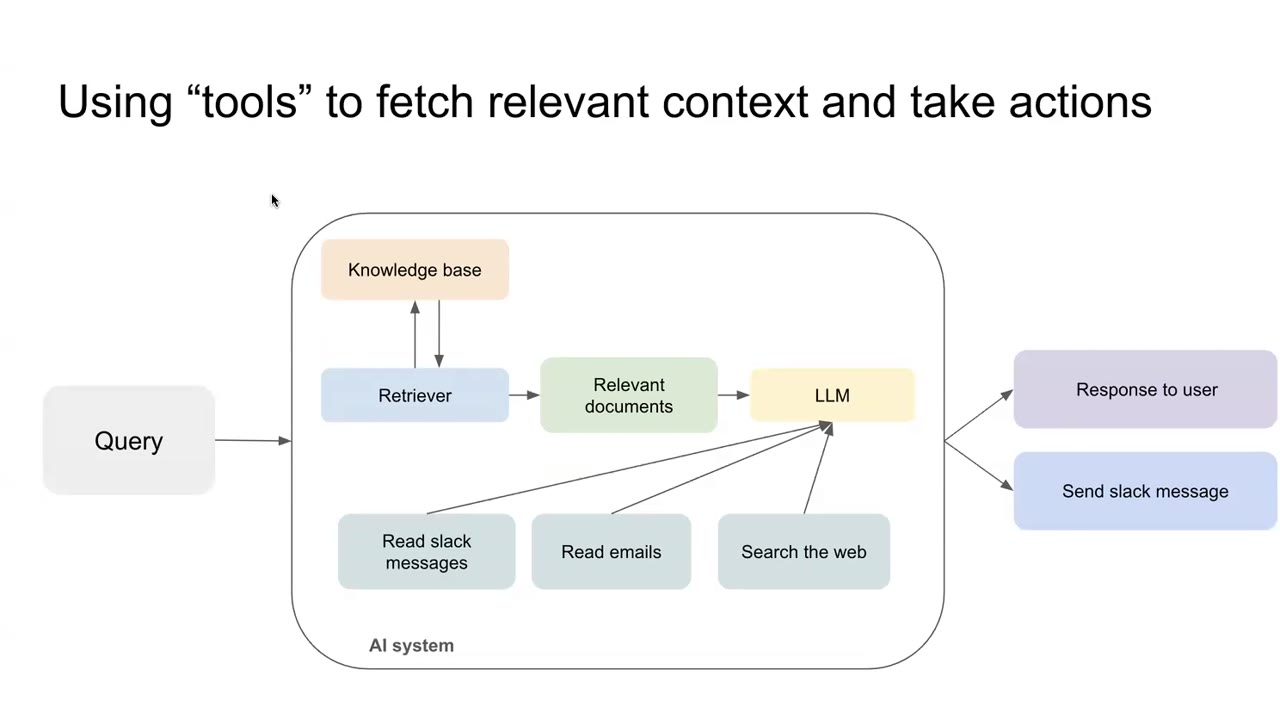
It's a single LLM call, but you could also have a knowledge base that is being passed to the LLM where given a query.
8:15
The answer should have should be given by referencing a particular knowledge base or like your company files so that the answers are grounded in that.
8:24
And then you are producing a response. It could also mean that your agent is using tools.
8:30
So what do we mean by tools? Tools are essentially a way for the model to interact with the real world or interact with other systems.
8:40
For example, reading Slack messages, reading your Google calendar invites, going and searching the Web.
8:49
These are capabilities the model doesn't inherently have, but it can invoke these tools to fetch data from different sources
8:57
and even invoke these tools to take actions like sending a Slack message, for example.
9:06
Each of these are agents in their own way, like or at least when someone says they are building an agent, they refer to all of this.
9:15
Right now, the common pattern amongst all of this is that they produce one of two types of outputs.
9:23
Either it is a text reply. Given the conversation history, you are producing a text reply.
9:29
And for those of you who are working on voice agents, eventually that text reply gets converted to speech.
9:36
But very rarely do you generate speech to begin with. You generate a text response and then you convert it to speech.
9:45
So either you are generating a reply or you are calling this tool call or you are making a tool call.
9:52
And which, as I explained, is talking to different systems, basically.
9:57
And if you actually look under the hood, the tool call is nothing more than a string formatted a certain way.
10:05
For example, this is an example of an agent where the agent asks, Hello, please tell me your name.
10:13
And the person is saying, My name is Priya Mehta.
10:17
So now the agent is updating this data that their name is Priya Mehta to a database to make that update.
10:28
This is a tool called, for example, but as you can see, it is a string.
10:32
It is still text. It's just text formatted in a specific way.
10:40
So essentially all types of outputs for all the agents that you can think of are either a reply, a text response or they are a tool call.
10:50
Is everyone clear with that? I'm happy to explain or any doubts that you might have before we go ahead.
10:59
Please feel free to like unmute and ask. It will be helpful for you and for us to for this to be very interactive and not like one way.
11:08
So please don't worry. Just ask if you feel stuck anywhere.
11:14
We see several thumbs up. I don't know if you see that. I mean, I don't see.
11:18
So thanks for that. OK, so the whole takeaway, as I said, is that.
11:24
All the evaluation that you also want to do then can just be evaluating the next reply.
11:31
Is it adhering to whatever criteria you care about or is the agent calling the right tools?
11:38
Evaluation can come down to basically these two things.
11:42
Right. And now we'll pick a specific use case that we are working on and used to show how we evaluate this agent.
11:53
Hold on. Good question. Yeah. Hey, one question.
11:58
And I was sorry I took a while because I was trying to map if this maps to a text or a tool called.
12:03
So I'm I'll take the example of form filling. Right.
12:08
There might be instances in which we are trying to help someone get through filling a form.
12:15
And in that case, I feel like the most useful thing a model could do is sometimes take like free text input from a user or take kind of like an open ended kind of query and try to map it to what they should do next.
12:29
So it's not really a tool call in the sense that it has to come back to the user, but it's not free text back from the agent either.
12:36
Right. So how do we think about that? Because we still would want to evaluate if the agent is giving the right option back to the user.
12:44
I think I sort of maybe push back a little bit again that that also can be framed into either a tool call or or a text response.
12:55
So, for example, if you are saying that it is being mapped into something. Right. So you can think of it as a structured output that you are asking the model to produce.
13:05
Right. So even that is that is that correct? Like are we aligned that you are asking the model to produce a structured output? Is that correct?
13:14
Yeah, that's right. Yes. So even that structured output can be thought of as a tool call.
13:20
So tool call have different types. One type is calling this web search or calling your database.
13:26
But producing a structured output is also a form of tool call.
13:30
Well, yeah, it's we can talk about the terminology, but essentially you are even for tool call.
13:36
It's a structure that you are producing. Like, for example, if I go back to this example here, the structure essentially is give me the name.
13:46
Right. So the problem that you are talking about can be also framed as a structured output.
13:52
Does that make sense? Yeah, that makes sense. Awesome. Great.
13:58
So we'll talk about the form filling voice agent that we've been working on.
14:02
And very quickly, the motivation is that forms are a big part of the public health systems.
14:07
Majority of the users have limited literacy. So they don't like interact with the digital interfaces.
14:13
And voice is the way that they usually interact. Usually a frontline health worker is has to be present.
14:19
And they have to ask these questions to every user and sort of interview them.
14:24
But the capacity of these health workers are limited. Right. So the idea is, can an agent instead help the end user fill the form?
14:33
This is like a quick demo of what we've built just for you.
14:38
Can you hear the audio? Please let me know. I can't see any.
14:41
Yeah, we can hear.
15:07
For those of you who don't understand Hindi, I will explain that in like a little bit.
15:37
003060871.
15:54
So I present that like it looks like a very simple form, but there are like multiple things going on.
15:59
There is a. So just for everyone's clarity, who does not understand Hindi, essentially, this is asking the name.
16:05
This is the district. This is the name of the health worker, whether they are pregnant or not.
16:11
If they are not pregnant, what is the name? What is the birth date of their child and their phone number and whether their WhatsApp number is the same or not?
16:19
So there are a couple of things happening here. Number one, there is branching.
16:24
So this question where they ask whether the birth, what is the birth date of your baby should only be asked if the person if the mother is not pregnant.
16:36
If she was pregnant, this question would not have been asked.
16:39
So there is a branching here. And if the WhatsApp number is marked as same, then this question should not have been asked because this value is inferred.
16:49
Right. And there are other complexities around how certain things are spoken.
16:55
But a simple looking form can have many complexities as well.
16:59
Inferring of values, skipping feeds, whatnot. And obviously, this is the best case scenario that I have picked for the demo.
17:08
But we'll talk about the issues. And very broadly, the way it works is when a user speaks, we convert it to text.
17:15
We detect if there is any silence. We detect if the user is done speaking.
17:21
Then there are two elements that work in parallel. One LLM generates the next reply that is being that is to be said to the user.
17:29
And then that reply is converted to speech. And a second LLM in the background keeps updating the form data that is received so far.
17:38
So this form is kind of updated live. It's not updated at the end of the call so that we get we sort of keep updating whatever we get so far.
17:48
Right. And there are so many issues that can happen in this. And they do happen.
17:52
We see that on a regular basis. And I have only listed a few of them.
17:57
For example, speech to text really struggles with like proper nouns when they are placed in a noisy situation,
18:04
which is typically what we see when we go to the field. What you heard was me doing it in my room.
18:09
It was pretty quiet. I deliberately made it quiet. Right. And transcription doesn't work as well for low resource languages.
18:18
That's just on speech to text. Few of them on the LLM site.
18:23
We wanted to do some validation as well. For example, if the response is incomplete or it is wrong, we should flag it.
18:31
The model may not flag it. It may accept an incorrect value.
18:36
As I said, if there are certain rules which should have been skipped, does it skip them?
18:41
Does it mistakenly ask them for rules whose values should already have been inferred?
18:47
Like the previous case, if the WhatsApp number is the same, it shouldn't ask the WhatsApp number again.
18:54
I again showed you a very best case scenario, but there are many cases where it doesn't happen.
19:00
Similarly, the LLM 2, which is supposed to capture the data.
19:03
It may incorrectly capture an incorrect data and update that to the database as opposed to rejecting it.
19:12
For example, for phone number, instead of storing it as a string, it may store it as an integer.
19:21
Then suppose if the user made a mistake early on in the conversation, which they fixed later on.
19:27
Did the LLM handle this update or did it stick to the previous incorrect data?
19:34
So please let me know if any of this is not clear.
19:37
But my point to convey is that there are many, many failure modes that can happen here.
19:44
Sorry, I have one question. When you say LLM 1 and 2, does that mean you're using two separate models?
19:50
Or what do you mean by that?
19:53
Yeah. So what I just mean here is we have two different LLMs doing two different tasks in parallel.
20:00
Right now, their model configuration could be the same.
20:03
Both of them could be Gemini or both of them could be the same version of GPT.
20:09
But they are performing different tasks.
20:12
And what is the objective of having them to be separate?
20:17
Yeah. Yeah. Sorry.
20:19
The problem is that if we try to keep them the same in the same synchronous flow that, OK, I got an input.
20:28
I then update the data first and then send the reply to the person that adds additional latency.
20:36
What you heard, you probably heard that the latency was two to three seconds per reply, which was reasonably OK.
20:43
Right. But if we add this step, it becomes five to six seconds at least.
20:48
Yeah. So you're essentially separating your workflow into two separate branches.
20:55
Also, the accuracy might be affected if the same model or the same in a single LLM call, you're trying to do multiple things.
21:04
Right. So, yes, it does happen as well. That is also another reason.
21:10
So is it accurate to say LLM1 is doing text to speech as in reading out the question and LLM2 is speech to text filling in the form?
21:24
So both LLM1 and LLM2 operate after speech to text.
21:28
OK, maybe the diagram is a little confusing.
21:32
But like they both happen after this first step of understanding the speech.
21:37
Right. So the idea of this row is that this is all speech processing, like initial speech processing, converting speech to text,
21:45
identifying if the user is silent now and identifying if they are done speaking.
21:50
These two are different. There is a slight difference there, but both of them operate only on the text.
21:56
The only difference is this one takes the text, produces the next question, not just the text,
22:03
but the conversation history so far and the new text. Right. LLM2 takes the conversation history so far and the new text,
22:11
but it updates the back end with the form data. So the form data looks something like this.
22:17
Right. It's a structured output that, hey, given this conversation so far, I know the name is this,
22:23
the district is this and the name of the Angamwadi is this. So far, that's the job of LLM2 updating the data to the back end.
22:33
OK, and sorry, one last question, which LLM handles translation and transcription are,
22:39
you know, is data being entered in Devanagiri or in English?
22:45
And is that a failure mode as well, the translation of dialects, etc.?
22:49
Yeah, right now there is no separate translation step. We directly feed whatever we get from the speech to text.
22:56
So depending on the speech to text provider, the output could have been in Romanian.
23:01
Sorry, could have been in Roman numerals. It could be in Devanagiri. It could be mixed.
23:06
We don't really care at this point. It just goes directly to the LLM.
23:11
And yes, that's an analysis also that we have been doing on how does that affect the final accuracy?
23:17
Yes. Does that help answer your question? Yes, thank you.
23:24
Cool. So now that we sort of understand the setup.
23:27
Wait a moment. Yes, we have a question.
23:31
So if I understand it correctly, LLM1 is an interface and LLM2 handles the persistence.
23:39
Sorry, LLM2 handles the? Persistence.
23:43
What do you mean by that?
23:46
I'm guessing LLM1 is stateless and LLM2 handles the state of the form.
23:56
Both are stateless in a sense that it's a fixed prompt.
24:00
The input to both of them is the same. It's the conversation history so far and the last message from the user.
24:07
So input is the same and they both have different static prompts.
24:12
And they both perform different jobs. One produces the reply to be sent to the user.
24:17
And one just does a background data update. So the user doesn't see anything that comes out of it.
24:23
Does that help? I had a follow up question.
24:26
So like both these LLMs do they operate in parallel or LLM1 sort of triggers the LLM2 input?
24:33
Both update. Both work in parallel. That sort of what is the aim to reduce the latency?
24:38
Because their job is not dependent on the other.
24:45
We have one more question.
24:51
Sorry, I'm guessing I'm going to touch on this, but how do you handle form validation?
24:56
What's your experience with this flow with voice and LLMs in terms of determinism?
25:02
You know, of course, in traditional flows we have very specific input validation that's there.
25:07
Are you doing something in that regard here also? Yeah.
25:11
Yeah. So because so again, earlier we were trying to bake in validation into the same process.
25:18
That OK, until you validate, don't go ahead and don't ask the user.
25:23
But that would sort of affect the latency. So what we do is we handle the validation in the LLM2 channel.
25:29
Then it first extracts the data. And what we found is that the most powerful LLMs,
25:37
like we are using GPT 5.4 now, it is able earlier models were not able to do validation on their own.
25:44
Because the problem is if you use a rule based classifier.
25:48
So LLM2 extracts a formula. We then apply a rule based validation.
25:54
If it fails, we have to again pass it back. It could be a mistake on this LLM side or it could be a problem from the user side.
26:02
So now what we are doing is we are letting the LLM itself do the validation for the easy validations, at least.
26:08
Like, hey, phone number should be 10 digits. Right now, we don't need a rule based classifier.
26:14
The latest models are able to do that validation by themselves.
26:18
So right now, a lot of the validation is baked into the LLM itself.
26:23
That reduces the latency. The main purpose is to reduce the latency so that if it is wrong, it rejects it in the first go.
26:29
As opposed to producing something, then we reject it, then we feed it back.
26:34
So how sorry, just a follow up question. Wouldn't that break in the future?
26:39
Say the LLM, since it's very dependent on the LLM, say tomorrow, like, you know, 3.8 or whatever model you're using, right?
26:47
Something is messed up, then your entire flow is broken, right?
26:50
In terms of just sanitation, not the data itself that is captured from the user.
26:55
How are you looking at that? That's the purpose of our evals, right?
27:00
To make our evals set big enough, diverse enough that a test passing is not a random fluke.
27:07
It is systematic. Yeah. Got it. Thanks so much.
27:12
Do we have another question? I heard some. Yeah, I had a question just to clarify.
27:17
And maybe I missed this when you described it. But when you're talking about the simple validation, right?
27:22
Like the phone number, number of digits in this setup, it would be done by LLM1, right?
27:27
Because then it would go back to the user and ask them to get that number again.
27:30
Yes. Both of them are supposed to do it because even this one is supposed to reject an input which is not valid.
27:39
Right. So both of them have validation rules. Yes. Thank you.
27:46
Cool. Should we go ahead now? OK, go ahead.
27:51
Let's sort of start actually testing it. Right. And that's where we now go into the tool.
27:56
Right. So before that, maybe just a quick intro that the idea is that as many of you have shared,
28:04
evaluation has been hard, not any simple way to do it.
28:07
And that's why sort of we have built Calibrate because we saw that we are repeating the same things,
28:14
not just for one nonprofit, because we work with multiple nonprofits repeating the same thing for many of them.
28:20
That's where the motivation came. Let's make it like a tool so that we don't have to.
28:24
And more people can participate in the eval process. Right.
28:28
And it's also specifically built for nonprofits so that it's you can self host it within your infra.
28:33
There is no like per seat pricing. It's not like bloated like Langfuse where self hosting is like a mess.
28:41
It is super simple. Already a couple of nonprofits have self hosted it.
28:45
We can help do that for you. There is no vendor lock in. We support all models that are out there.
28:51
And so now let's sort of get started. Right. OK, I will start creating a new agent first.
28:58
And so, as I said, we have these two different elements. So first, I will evaluate my first element.
29:04
OK, so let me call it like test chat. And there are two ways that we have.
29:09
One, you can actually build the agent within Calibrate itself for evaluation.
29:14
But because most of you have agents externally built, you want to just connect it.
29:19
Right. So that's we support that as well. So now for collecting it,
29:24
we essentially just need your API signature and I'll copy that.
29:30
No, this is the API. Don't see your screen. Oh, sorry.
29:35
Yes. Is it OK now? Yeah. Yeah. OK. Yeah.
29:40
Just to show you basically what I did was come here, select a name and select connecting my existing agent.
29:46
That's it. Right. And that sort of took me to this page. And now I have added the URL for my agent.
29:52
And we have a step for verification just to confirm that we expect a certain input format and a certain output format.
29:58
And your API is sort of adhering to that. Once that is done.
30:03
So your agent has been connected to Calibrate now. Now, let's sort of create a test.
30:09
Now, if you go back to my slides, we had said that there are two types of tests you can make.
30:15
Either you sort of test the next reply or you test the tool in location.
30:22
So this one is the first type next reply, because we are evaluating agent LLM one right now, which is responding to the user.
30:32
So what we will do here, every test case is a replication of the conversation history required to trigger that scenario.
30:40
And please let me know if I am being confusing. This is also our first time presenting Calibrate properly this way.
30:47
So we could also make mistakes. So please let us know if anything is confusing.
30:52
So explain that again, that the conversation history.
30:57
Yes. Yes. Maybe I'll just show that to you and that will also help you.
31:01
For example, suppose I want to very the most simplest check that I can do is that I asked the agent,
31:08
asked the user for their name, the user gave their name and the agent moved on to the next question.
31:14
OK, very simple test. So this is the first user message. So suppose the user said, hi, agent said, hello, what is your name?
31:23
I am creating the test scenario, the test input at this point.
31:27
So the agent said, what is your name? And the user said, my name is Amal.
31:32
Right. And what I am now testing is the next reply after this next reply of LLM one after this.
31:41
OK, so and my test criteria is that it should accept the value for this for name.
31:51
And ask the question on this bit. Whatever.
32:00
So this is my test case. What does this mean? My agent will get this conversation history as input.
32:09
Now, and I will evaluate the output of my agent with this criteria.
32:14
OK, so let me sort of just create that test and I run this test now.
32:20
So this will actually call my agent, look at the response that it gives and then run it through this LLM judge criteria and give me the reasoning and the score.
32:31
So here you can see that the agent said, OK, tell me the name of your district.
32:38
And this score is by our LLM judge that it is saying that it is correct.
32:43
And it is also giving a reasoning for why it said it is correct.
32:48
Is this basic test super clear? Yeah. Awesome.
32:55
Right. So this was a very simple test of how you can check the next reply.
33:01
Right. But now the problem here is that we have put only one criteria.
33:08
Right. Like we said, OK, it checks. It asks the next district. But suppose if my agent said, OK, I captured your name as Aman Dalmia.
33:17
And now we can move ahead to the next question. And the next question is district.
33:24
So you tell me the name of your district that would have still passed this criteria.
33:29
Right. But it would be unnecessarily verbose and lead to a much longer message for the user.
33:36
So my point of saying that is when you evaluate any the quality of your response, you ideally want to evaluate multiple dimensions.
33:47
Is that you? OK.
33:53
So we don't want to sort of merge everything within like one one metric and sort of just move to the slides.
34:03
That if you are merging or collapsing everything into one metric affects your accuracy measurement, leads to information loss.
34:10
Help me. Don't see the slides. Don't see the slide.
34:15
Sorry. Sorry. Sorry. Not very bad at this. OK. So, yes, it leads to like loss of information.
34:22
Makes it hard to isolate issues because we then have to go and read the reasoning for everything.
34:27
But hey, which where was it wrong? Right. It also confuses human reviewers.
34:32
If you ask them to evaluate multiple things within a single metric.
34:37
And that leads to low quality labels. And it also confuses automated LLM evaluators that you build.
34:44
It reduces their reliability because they might swing between different extremes.
34:49
If you are measuring multiple things within the same quality. For example, if for a maternal health chatbot.
34:56
These are four different dimensions of quality. Right. Is the message accurate?
35:00
Like whatever was given, was it medically accurate? It is possible that it may be incomplete.
35:06
But whatever was said was accurate. Right. Similarly, completeness would check that.
35:11
Hey, is everything that should have been said is spoken. Then a second, third thing could be context awareness.
35:18
For example, asking the user that, hey, you should eat more protein.
35:22
And for that, you eat chicken. That may be medically accurate and complete.
35:26
But it may not be contextually appropriate for a user for whom chicken is too expensive.
35:32
For example. Right. And then communication quality might check something completely different.
35:37
It just checks. Hey, is it in like good bullet points? Does it sound use simple language?
35:43
Does it have any jargon? It could be medically inaccurate. Right. But does it satisfy these criteria?
35:49
Right. So the point is that you typically want to measure quality across multiple dimensions.
35:56
Does that make sense? Anyone has any doubts? OK. So now how do we do that here?
36:05
Right. What you saw within this test that we made here was the default evaluator that we used for correctness.
36:14
In this case, I'll cover that separately of variables within evaluators.
36:19
But let me make a custom evaluator. So I'm choosing to evaluate the LLM response.
36:25
Like Calibrate also supports evaluating speech to text, text to speech.
36:30
And we are talking about LLM right now. So I'll just make an LLM evaluator and maybe I just look for like concise.
36:38
And we can choose like multiple types of evaluators, binary rating within rating.
36:44
It can be whatever rating scale you want. You can give a prompt for each scale.
36:48
But let me keep it simple that like save concise form.
36:54
It's my evaluator for form fill. And I'm just updating the prompt that the response should never fall back.
37:03
The user's message and. It should be one line.
37:10
So it's a custom evaluator that I have built. Now I can go back to my test.
37:17
And I can add another evaluator, which is my concise form fill evaluator to it.
37:23
And now when I run the test, it will evaluate this not just in that dimension.
37:29
It will evaluate across both the dimensions. Right. Does that make sense?
37:39
OK, so the response refers to this by asking for this, but it does fall back the user's message.
37:46
It's only one line. OK, so here there is a clear problem with the evaluator itself.
37:52
This response is actually doing well, but the evaluator here is wrong.
37:57
Right. And we will address that later as well. We will cover updating your LLM evaluator to match human labels as well.
38:05
But for now, what I just want you to take away is that you can evaluate your quality across multiple dimensions within calibrate itself.
38:14
As many dimensions that as you want. I'm assuming that is like super clear at this point.
38:23
And just one more point to touch upon is that sometimes you don't want to build like a separate evaluator for every test case.
38:35
What you want is like a base prompt where just a variable is changing for that particular row.
38:44
So, for example, as we wrote the criteria. Right. The idea of correctness is still the same for most test cases.
38:53
But what does correctness mean for this query? That varies per query.
38:59
Right. So we also support like adding variables so that you have one base prompt and you just tweak that variable for your individual test cases if needed.
39:11
For many other cases, like the evaluator that we built, there was no variable.
39:17
So it's the same evaluator that applies as is to all the tests.
39:22
Is that clear to everyone? OK, great.
39:28
So now let's look at we look at next reply. Right. Now let's look at tool calling.
39:34
OK, so I'll call this. This is my second LLM2 which I'm evaluating now.
39:41
And I'll add the second LLM thing here and I've verified it.
39:48
Yeah. So, Aman, we can use this to evaluate the final response from our AI agent.
40:01
But what if we want to also evaluate, suppose, you know, there are a lot of smaller steps happening in the middle.
40:10
How can we evaluate those? So depends on what you want to evaluate.
40:16
I mean, the other eval tools I have seen, like Phoenix, they allow you to capture output from parts of the code.
40:28
Right. So. So is that something that can be done in Calibrate 2?
40:33
Yes. Yes. So the and we can talk more about it separately, but essentially the idea there is that for each of the individual parts,
40:42
if you can expose the API so that it returns that intermediate output.
40:46
Right. I think that can be evaluated because that intermediate output again will either be next reply or tool call.
40:52
OK. Correct. Does that make sense? Yeah. All right. So now we are looking at evaluating the tool call.
41:00
Right. So now here, instead of sort of using the UI again to make everything again, I'll just use an existing test I have made for the tool call.
41:12
And I'll add that to my agent and we look at what this test looks like.
41:16
So what this looks like now is, OK, the agent asked, please tell me your name.
41:20
The user gave their name. Then the person asked the district and the user stuttered a bit and gave their district.
41:28
So then my test case is saying that this tool call will form, which is the tool that my agent is using should be called with these particular parameters.
41:39
OK. Is that like super clear? OK, great.
41:49
So let me sort of have this and now I can run this with my LLM 2.
41:55
Right. And it will essentially check if the right tool is being called. If it's the right tool, is it calling with the right parameters?
42:02
OK, there is some bug. I'm so sorry, but it works. Sorry. It always happens during a demo only.
42:09
So I'm sorry. OK, so that's I can I'll actually just show you maybe the results from a previous run.
42:22
OK, so this is this is the results from the previous run, where given the conversation history, my agent gave a tool call, but it didn't match the expected tool call.
42:34
And you can see the reasoning for it, where this particular feed was a mismatch.
42:41
OK, this it expected this value, but it got this value for this argument.
42:48
That was the mistake in this tool. Is that like super clear?
42:55
So for these kind of evaluations, I mean, you cannot possibly provide all sorts of test cases, right?
43:02
This is just one scenario where something went wrong with free text.
43:07
There are so many things that can go wrong. How do you ensure that you are, you know, all bases are covered?
43:16
Yeah, yeah, that's a very good question. Maybe that's a separate thing that we want to also tackle,
43:21
probably in like a follow up session on the data set design for this.
43:25
Right. So what is that? There are like if you look at the number of tests, there are 90 tests here.
43:31
OK, is 90 tests are only for tool calls. So for all the different scenarios, because we have like eight feeds.
43:38
So we have many, many test cases where we are covering two messages in the conversation history, four messages in the conversation history.
43:45
If it is in Devanagari, if it's in Roman, then so all the permutations and combinations we are tracking.
43:53
You can talk about that's a whole different session on designing your data set. Right.
43:59
But we do do that. We essentially use an LLM in like a generator verifier loop.
44:06
We use an LLM, we give it like a set of base test cases.
44:10
And then for each scenario, it sort of uses an LLM to generate a unique test case.
44:16
And then we have an LLM verifier which verifies if the test case matches the criteria that I have set up.
44:23
Like, for example, if it is supposed to be all Devanagari, then the LLM verifier checks that indeed it is all Devanagari.
44:31
Right. Because sometimes it is possible that the model, the generator model could have still given like non Devanagari text.
44:38
Yeah. That's a whole separate talk that is there on how to generate this.
44:44
And just as a follow up, once that is generated, you don't have to manually come and create these tests one by one.
44:52
We have like a bulk upload kind of support here, which essentially lets you say, OK, which type, which evaluators.
45:03
Right. And it will give you like a guideline, the guidelines for the CSV format bulk upload.
45:09
So what I typically do is just I pass this to an LLM.
45:13
I passed my data set generated to the LLM and I just say format that into this format.
45:19
Right. And once that is done, I just upload it here. So I don't have to create the test one by one.
45:25
I am just showing that to you right now so that you understand the foundation of this.
45:31
But, yeah, you don't have to manually create any of these tests.
45:36
Next reply or tool call. Just use Claude or chat GPT with whatever test you generated with the CSV guidelines and it will work.
45:46
It should work at least. Is that like clear? Does anyone have any doubts?
45:53
Yeah, I'm sorry. Go ahead.
45:58
Maybe it's a very basic question. It's my ignorance. How would one infer whether the response is legit?
46:05
And, you know, suppose it's the name of a district. So it is indeed the name of a district that the model has captured.
46:12
Is it a function of the training of the LLM? So, OK, it depends now on again how you are training the test case.
46:21
Right. So if you look, let's look at that. So when I am creating my test case here, I am already.
46:29
Oh, only PDFs. OK, I'm so sorry. OK, so if you look at the test case here,
46:36
we can see that in the expected tool call, we are already telling it that the Zilla should be Pune.
46:43
Right. So when we are comparing this, we are not relying on any LLM knowledge.
46:50
We are relying on the test case generated itself. That is saying it should be Pune.
46:56
We just check if it is a Pune or not. For this particular case.
47:01
Yeah. Does that make sense? And what would happen in case of a phone number?
47:05
Phone number, it would just pick up whatever 10 digits the number the person gives, right?
47:11
So again, that's the separation between the LLM, which is being evaluated and what we are evaluating,
47:17
what you are saying, the LLM will pick up the digits or not. That's on the LLM that is being evaluated.
47:23
That is your agent that we are evaluating. But when we are making these test cases,
47:30
again, we come back to the two types. When it is a tool call, we are giving it the exact value it should be.
47:37
Right. So we are saying exactly your LLM should say phone number is this number.
47:43
But your LLM is saying this number. Right. So we are just comparing.
47:49
Is this the same or not the same? That's it. The inferring is left to your agent, not us.
47:58
Does that make sense? Yeah. Can you explain again if it's not? Thank you so much.
48:03
OK. Neha, please go ahead. So I mean, can there be human evaluators in this loop?
48:10
LLM judge evaluators in this loop? How does how would those foreclosed be different?
48:15
Yes, that's the next part, because that's the next part. We'll come to that. Yes. Thank you.
48:22
One more question. Yeah. Just building on what Pallavi was asking.
48:26
And I'll take the same example to make the question easier. If you're trying to evaluate,
48:31
if the output was actually a district or was a valid district, let's say.
48:37
Right. And maybe you're not sure if in general, based on general training data, LLM may not have that nuance.
48:43
Is there a way in the tool to basically say this is like a super set of like acceptable responses and ensure it's mapping to one of them?
48:52
Yes. So let me try this. So I think there is two kinds of validation that I think we are kind of mixing.
49:02
There is one validation in the production system. Right. When you are in deployment, obviously, we don't know what districts they might see.
49:11
So that is just for today's conversation. We call it validation.
49:16
And I think what you said was, yeah, keep a bank of valid. But that's the design of your solution.
49:25
Now, once I have designed that solution and I feel confident, then let me write enough test cases to make sure that I have enough
49:34
variation of valid or near misses in my district name.
49:39
That's the thing that calibrate. You can do it here in calibrate. Not sure if it's clear.
49:48
Yeah. And maybe just double double click on that.
49:52
Like suppose like this is the response from the user. Right now, this is LLM production.
49:58
This is your your LLM production. Right now, this either accepts it or rejects it.
50:05
Right now, calibrate sits outside of all of this.
50:10
Right. Like it, it will either accept it or reject it and then it will produce some response.
50:15
Right. Calibrate evaluates. It takes this and it evaluates the response.
50:21
Right. Was the response correct or not? Right.
50:26
And your test case, like given your test case, suppose your test case was Rampur.
50:33
I don't know. I don't know. I think it's the right name. Ramagiri. I don't know. I'm just creating something. Rampagiri.
50:38
Right. Now, the LLM, suppose, gives a response and it says, great, let's move ahead.
50:44
Right. It is the part job of your test case to say the response should reject it and ask for valid district.
50:55
Right. This is what you put in calibrate. But this is in your production.
51:01
Is that super clear? I'm sorry if it was repetitive. I couldn't resist.
51:08
So sorry, just to clarify, I mean, basically, when you in calibrate, you have to define a test case with soft source to speak ground truth,
51:17
which means to calibrate the and evaluate the LLM some kind of this is what how it should behave for this particular input has to be given.
51:28
It can't be just here's the input and you have a human evaluator looking at the output with no ground truth or so as to say speak like correct answer.
51:37
Answer key. You can.
51:44
I'm just thinking one second. So, no, that's not necessarily true. That's just one type.
51:50
For example, OK, let me go back. Yeah. You can give a tool call and say this is if it's in one of them, accept it.
51:59
So, yeah, like, for example, I talked about suppose we say we add another thing on like.
52:08
Validation check, for example, right. And the criteria that we specify is make sure all the value is within one of these.
52:23
And this one of these is a variable valid values. OK, list of valid values accepted for this test case.
52:36
OK, so you create the evaluator right now when you attach it to a test case.
52:43
Right. So I go back to my test. And now when I am attaching this evaluator.
52:53
Validation check. I get the option. So, for example, here I can say name should only be Aman Dalmia or Jigar Doshi, for example.
53:05
Right. And I can run this test. Does that clarify like what we were saying as the ground truth was just one type,
53:18
like if you want to check correctness, you sort of specify a certain way.
53:23
If you want a list of valid values, you can specify that separately.
53:27
So here it is running that right. That hey, the value is Aman, essentially.
53:32
And you can also specify maybe for text responses.
53:38
Another check could be just specifying some criteria that it should satisfy.
53:44
Well, you know, the way the response can be varied. You don't expect a certain value to appear in the text.
53:55
But you want to say, OK, the text should be like you did for concise, I suppose.
54:00
You know, it's a it's a property of the response. It's not looking for a certain value in the response.
54:07
Yes. Yes. Either you make your test cases customized.
54:11
Essentially, here we said validation check is a base level check.
54:15
But what validation means for this test case is different from that test case.
54:21
Right. When we are validating district list of valid values is different.
54:25
When we are validating phone number, what validation means is different.
54:29
Right. Does that clarify the doubts from everyone as well?
54:35
You know, I love it. What I didn't realize is Neha Verma is on the same call as me.
54:46
Make my pick up a pick up a.
54:55
I guess I understood that it makes a lot of sense.
54:59
I because sometimes some of the LLM outputs will give is like rationale.
55:03
Right. Explain why you gave this output and you can't really have a standard set of values in there.
55:08
But maybe you're saying, OK, is the rationale coherent? Is the rationale comprehensive?
55:13
So that that really helps. Yes. Yeah. Makes sense.
55:16
But some criteria, basically, as long as you have any criteria in mind,
55:20
it can be a blanket criteria for all your tests or it could be a high level criteria,
55:24
which is slightly customized for every text, every test.
55:30
Pallavi, was your doubt also answered? Just to double check.
55:35
Yes. Thank you. So great. So now we have done all this evaluators.
55:42
But the problem is like, OK, can we really trust these evaluators,
55:46
which we already saw that we couldn't trust the evaluator when the response is correct.
55:52
It still didn't work. Right. And there are many reasons LLM judges don't work.
55:59
There is they tend to prefer the outputs from their own model family.
56:04
They tend to prefer like longer outputs. They tend to have like a bias, like which which response.
56:11
If you're comparing multiple responses, which response comes first.
56:15
So there are multiple biases in LLM judges in themselves. We cannot blanketly rely.
56:21
And what's the process then? The process is that we have to evaluate these evaluators also.
56:28
Right. We have. And the way to do that is for your test that the way we had, we run the LLM judge.
56:35
So the and we run this and we have human labels as well.
56:40
Right. So we have the first LLM output that is being evaluated. Then we have the human label.
56:47
Right. So the human, the human label, which we are getting from human reviewers.
56:52
And then this is our evaluation prompt or LLM judge. And then we evaluate the LLM judge.
56:58
Right. So we sort of check whether the judgment by the human matches the judgment by the LLM.
57:05
Right. And if it doesn't, we go back and update this prompt and we keep doing it until this,
57:14
the judgment by the LLM judge starts matching the human judgments.
57:18
And that's when we sort of trust it.
57:21
And that's when we can sort of run it on all the queries on our production data, because obviously humans cannot review every query.
57:28
And that's how we scale monitoring. Right. So now let's sort of see how can we make our evaluator reliable as well.
57:37
So before that, does everyone understand this idea of evaluating the evaluator now?
57:42
I know it's a little meta, but is that super clear? OK.
57:50
Cool. OK. OK, let's see how to do that now. So suppose someone has a question.
57:58
I have a question here. All right. So pardon me, I've got a bad throat, but I'll try to be.
58:04
So, you know, this is a good framework. But then do you see that?
58:10
I mean, what I believe is any output of LLM is more probabilistic than deterministic. Right.
58:16
And so while having said that, do you see governance as a separate architectural concern beyond your LLM evaluators themselves?
58:28
Can you maybe expand a little bit on what you might mean by governance?
58:32
So, as I said, any output that we get directly from an LLM, you know, for example, the evals that you've been using,
58:42
let's say based on that, based on a certain output, you would judge whether you decide whether you would want to you'd want the next question to be asked or not.
58:52
Right. So, for example, let's say in terms of policy informants or enforcement, especially in the areas that we that I work on, rule based validation.
59:01
Right. Or having a cross model consensus that it becomes more.
59:07
For example, this framework seems to assume that an LLM judge can become sufficiently reliable evaluator to prompt alignment and some human intervention.
59:18
But since the evaluator itself is still probabilistic and inherit some model biases.
59:23
So do you think we should introduce a deterministic governance layer around this evaluator?
59:30
And do you see that as a separate architectural concern? Let me try and answer this.
59:36
Yeah. So I think you can think of evaluation in two two steps.
59:40
Right. So this kind of evaluation is to build enough confidence that you feel that you you might want to send to production.
59:50
Now, in production, the governance framework might be different where you might have certain rules and their rule based system probably is the most safest.
1:00:03
But generally, rule based systems are scaling. So I think that's the fundamental trade off that evaluation can help you determine your risk.
1:00:11
It is probabilistic. It is risky. Yes, this is known. There is no you can't really escape that.
1:00:19
So then it's a matter of really having an accurate error bar on where it works, where it fails and where you are comfortable pushing it and where you are not comfortable.
1:00:30
Right. So. So we are not really trying to make a case that LLM judge is the way that is all be all and all.
1:00:37
And this will solve it. But this is a way to really scale, scale your evaluation and measure precisely.
1:00:46
Yeah. Appreciate that. Yeah. Awesome. Thanks a lot. Cool. So I'll get started.
1:00:52
Like now we have to align these LLM judge. Right. So let's create like a new labeling task for now.
1:00:58
So I don't know. And we sort of now select the evaluators that we want to align.
1:01:07
So in our case, suppose we picked this concise form. We picked correctness, for example.
1:01:14
Right. So let's create this labeling task now. And now we want to feed it the items that should be labeled in the first place.
1:01:23
So let's look at the tests themselves that failed. So here this failed.
1:01:27
I can just export the results out and I'll go back to my task.
1:01:37
And I can upload these results in. OK, so you can see that now one item right now.
1:01:47
Obviously, this applies to as many items as you want to. But we have added one item for labeling.
1:01:54
Right. Now we can sort of create first. We need to also create our annotators.
1:02:00
So suppose we have like two annotators here. I'll also add, I don't know, as an annotator.
1:02:04
Right. And now I can assign it for labeling.
1:02:10
So typically, especially in many other contexts, the final output can be very subjective.
1:02:16
So it is also possible that there may not be one single right answer or there might be inherent disagreement between your experts themselves.
1:02:25
Right. So if you just annotate to one person, it is possible that you are aligning your LLM judge to one person.
1:02:36
And if your data is being annotated by two different people, separate rows which are not overlapping,
1:02:42
the LLM judge might also be confused. One person is saying something. One person is saying something else.
1:02:47
So what we also support is labeling the same row by multiple people.
1:02:51
So you can compute inter-annotator agreement. What that just means is, are your labelers consistent in their labels?
1:03:00
OK, let's see what that looks like. Another problem is what we have seen, at least when we give it to other people to annotate,
1:03:10
is that sometimes some labelers can see the outputs of other labelers.
1:03:14
And that's the problem. Right. Because if I can see the output of someone else, I am biased by them.
1:03:22
Right. So what we also need is blind labeling by the annotators.
1:03:27
They should not be able to see the evaluations given by other experts.
1:03:32
So here we create these two annotation jobs. Now, these are very simple like UIs.
1:03:38
These are like individual jobs that you can send out to your annotators.
1:03:43
So, for example, this is what one job looks like. And it is also like mobile friendly and all of that.
1:03:49
So you can actually send it to your field workers to annotate very, very easily over the browser.
1:03:54
And they don't have to log in. Right. Because you already had the name.
1:03:58
So you and you have the job link map to that name. So you don't they don't need to log in.
1:04:03
They can just use it on a phone. Right. And they can give their labels here.
1:04:08
So, for example, I'm saying it is concise and I'm saying it is correct. Let me mark it as correct. Right.
1:04:14
And now I go back to my to my admin interface and I can check the labeling, the labels given by them.
1:04:24
So here I can see that this person has marked both of them as correct.
1:04:28
And now I can run my evaluator as well on this particular row.
1:04:34
So what happens is we have the same row that is that is evaluate labeled by a human.
1:04:41
And it is also getting scores by our evaluators. And so we get a alignment score now.
1:04:47
So this particular one is zero percent aligned just because it's one row.
1:04:53
And this is 100 percent aligned. All of this applies to like multiple rows and all that as well.
1:04:58
And we can easily see the disagreements here. So. What this means is our evaluator said this is wrong.
1:05:06
It's the reasoning. But Aman said this is right. This annotator said it is right.
1:05:11
So then we can figure out, hey, why is this going wrong? We might see that, hey, it is actually correct.
1:05:16
Only my LLM evaluator was wrong. So what does this supposed to do?
1:05:22
This evaluator is supposed to check that this is concise. It doesn't say back the response of the user.
1:05:28
Right. Which is correct. But my evaluator is not working. So what do I do now?
1:05:33
Right. I can now go back and update my evaluator.
1:05:38
So maybe the reason is that it is looking at the whole conversation history.
1:05:43
So I can say maybe, hey, only evaluate the last response.
1:05:49
Does it call back the users and never call back the users answer back to them?
1:06:01
And does it call back the user's answer? For example, does it call out their name again or their specific district again?
1:06:12
I'm just illustrating it. Obviously, it's not a good prompt, but I'm sure.
1:06:16
Yes. This is the last main bit, really.
1:06:21
So what we can do is now rerun this with our new prompt and we'll see whether the agreement has now sort of changed.
1:06:29
Right. So this way we have this whole loop where we send it out to labelers.
1:06:34
We see we also run our evaluators. We see where the disagreement is.
1:06:40
And now you can see it is 100 percent aligned. Right. And like there are some nice things like, oh, you can see this trend graph across versions and whatnot.
1:06:48
And obviously, this is like a super simple example. And you also get like row level data here.
1:06:55
Right. So if I see here. So for this particular test, my evaluator agreement with the human is 100 percent.
1:07:04
My evaluator's most recent value was correct. And Amman also said, correct, I can.
1:07:10
This is the live versions only. But I can also look at previous versions.
1:07:14
The previous version was wrong. This version is correct. Right. So, yeah, this way I can sort of run this whole loop.
1:07:20
And maybe just another thing is to now do the labeling job for the second annotator as well.
1:07:26
Now, suppose I mark this as correct, correct, whatever. And now if I come back here, I get an annotator agreement score as well.
1:07:35
So I can really zoom in on, hey, where are the annotators disagreeing? Right.
1:07:41
Yes. The slides and recordings will be shared. And so, yeah, that's any takeaways, like any thoughts, any questions, doubts, happy to answer.
1:07:49
But this was one big thing we wanted to really show that you can do here.
1:07:54
Yes. Is that was that clear? Was that like too much overload?
1:08:02
Sorry, because of the time rush. OK.
1:08:07
Cool. Let's maybe quickly now I just sort of speed up a little bit because we have voice agents.
1:08:15
Also, we also need to like evaluate the speech to text. And there we have the transcript.
1:08:20
We have the original audio. We have the predicted audio. So you predicted transcript.
1:08:25
So that's this is what we want to evaluate. Typical speech to text evaluation uses something called word error rate,
1:08:33
which is like you will see this. For those of you who may not be aware, you will see this all that all the place.
1:08:38
But like someone recently also put out a blog post where it says why it is not a good measure.
1:08:43
For example, you can see here, right, like part so versus part.
1:08:48
So word error rate will compare letter by letter, word by word.
1:08:52
And clearly the words are not same. It is not looking at the meaning.
1:08:56
But when you look at the meaning using an LLM judge, it can catch this well.
1:09:01
So even within Calibrate, I'll just walk you through the screenshot for now.
1:09:06
You can sort of create your data set, upload, select and you can compare across all providers.
1:09:12
Right. So whoever supports trans speech to text, just upload your data set, choose your providers, choose your language.
1:09:20
You will get a leaderboard across everyone. Right. And you will see the per row output as well.
1:09:26
Therefore, each LLM judge, you can see what was its reasoning. Why did it say this is same or it is not same?
1:09:33
And again, you can make your own evaluators. We ship like some default evaluators.
1:09:39
Like, for example, semantic match looks at the meaning of the two reference and predicted and phonetic match could check for.
1:09:46
Do they sound the same? Like, for example, I don't know.
1:09:51
I wish she can have double A or a single A. They sound the same. Right.
1:09:55
But the semantic match might fail. But phonetic match will pass, for example.
1:10:00
So you can create many other such evaluators for your speech to text also specifically,
1:10:07
depending on your use case. Yeah. Was that like I know it was super fast, but was that clear?
1:10:14
What we are trying to say. Any doubts here, like speech to text?
1:10:23
Any doubts? Should we move ahead? OK. Thumbs up. Lots of thumbs up.
1:10:28
OK. We also have text to speech evaluation. But before that, we also support.
1:10:33
And so what we were talking about so far were module by module testing.
1:10:38
So speech to text or LLM or text to speech.
1:10:44
But we also want to test it end to end. Right. And Megha will touch upon your question.
1:10:50
We'll also stay over after like 8.30 or so. So we can answer more.
1:10:55
Let me just maybe cover this one for now. Right. And so, OK, why is this needed?
1:11:00
Right. Like your individual components might work correctly, but do they work together when you bring them all together?
1:11:06
The typical way people do that is by just using it in production. But we support having realistic conversations.
1:11:12
So we simulate users. For example, you define different personas of your users.
1:11:19
Like someone might be curious. Someone might be hesitant. It could be a male.
1:11:23
It could be a female. Someone interrupts a lot more. Someone is more patient.
1:11:27
So you can create all these different personas of users and you can create different scenarios.
1:11:34
OK, what is this user doing? So a customer is asking for a technical issue.
1:11:40
Customer was like your persona. Technical issue is your scenario.
1:11:45
And you can design which metrics you want to use to evaluate the agent.
1:11:50
And then you can run a simulation for all persona scenario combinations.
1:11:56
Essentially, what it looks like is this. You can see here like the agent is asking, hey, welcome, Rajesh.
1:12:02
Provide your phone number and email. And our simulated user is responding to the agent.
1:12:09
Right. And we have the audios for both the agent and the simulated user.
1:12:15
And through this, we can identify error cases before it hits production.
1:12:21
If we already know what is the persona of our users, what are the different things that they are going to try?
1:12:27
So we can run this before we actually deploy something to production.
1:12:32
Is that like clear? Happy to answer more. But yes.
1:12:39
Cool. So that's that simulation. And finally, text to speech.
1:12:43
Again, you can evaluate your generated audio across multiple dimensions like pronunciation, naturalness, expressiveness.
1:12:52
And here again, we use LLM judges. But this time we use audio LLMs.
1:12:58
So these are models that can natively process the speech. So they can actually understand if it was expressive or not.
1:13:06
Was it did it sound natural or not? Right. And I'm not saying it is perfect, but it gives you some indication.
1:13:13
Right. And you can actually play around with the judge model.
1:13:16
If you see a new model that you think is better, use that Gemini Pro or OpenAI audio, GPT audio, whatever you want to use.
1:13:25
Again, similar steps. Upload your reference. Select your language.
1:13:29
All providers that support text to speech, at least the most famous ones.
1:13:33
Right. And then you get a leaderboard across the specific metrics that you decided.
1:13:37
So pronunciation, time to first byte, latency, basically. Right.
1:13:43
And row by row as well, like you can actually look at the reasoning for why this was not right, was correct or not correct.
1:13:49
And again, through the alignment process, you can align your LLM judge here as well.
1:13:55
Right. And a couple of examples of LLM judges are. Check for the pronunciation, check for the naturalness.
1:14:04
Yeah, that's it. Just. OK, that's it on the major demo.
1:14:08
We'll just have some closing thoughts. But if you have any doubts, please let me know. Happy to answer.
1:14:17
Was that clear? Any doubts? Yes, please.
1:14:24
I am. I don't know if it is fully relevant to this, but I just want to know your thoughts on this.
1:14:33
Like in government or social protection workflows where a system may influence the certain decision or outcome.
1:14:43
So in that case, how would you recommend the designing the evaluator pipelines so that the system remains the.
1:14:51
Like trustworthy or auditable and scalable through the different languages or different set of amount data we want.
1:15:01
Got it. Yeah, I think I think we might want to take this a little bit towards the end.
1:15:05
If you can stay on for a few minutes as well, we can discuss more about this.
1:15:09
Does that work for you? Yeah, sure. OK, cool.
1:15:14
So. So, yeah, just maybe a few caveats like currently like we are also nonprofit.
1:15:19
All the cost on the app is borne by us. So there are like severe limits right now to the usage for a random user.
1:15:26
But if you want to partner with us and you want to use the live version, we can update the usage for you, increase the limits for you.
1:15:34
And we have also self-deployed this, self-hosted this within other nonprofits and their infra.
1:15:40
So that is super easy to do as well. We can do that as well if you want to use this.
1:15:46
And I'm not sure if Gopi is here. And I'm sorry, Gopi, if you're here, we might have to speed things up a little bit.
1:15:54
But I don't think Gopi is here. OK, cool. And we have a bunch of these things on our roadmap.
1:16:00
More languages like setting up a deployment flow where all your deployment traces directly come here for you to review and like more agents within this.
1:16:11
So automatically improve automatically aligning your LLM judge by looking at the disagreements,
1:16:17
automatically flagging where your current agent is failing instead of you having to go through the test cases, even the labeling interface.
1:16:25
Some of you might want to tweak it. So potentially even using an AI agent to let you design custom interfaces and whatnot.
1:16:34
And also like this whole onboarding experience can be fully conversational, just like we are talking now.
1:16:39
We do. We would love to have. This sounds exciting to all of you as a user, as a contributor.
1:16:45
Please do consider contributing in whatever form you would like to.
1:16:52
Testing, giving feedback, feature requests, sharing your experience, sharing bad feedback, like everything is like welcome.
1:16:58
I learned so much, like we learned so much from the struggles that people are having from using the platform.
1:17:03
It helps us make it better. Right. And every form of contribution is like welcome.
1:17:09
And this is our WhatsApp community. So if you want to join, we'll be posting updates.
1:17:13
You can ask doubts, help shape features, share resources, help each other, reach out for collab pilots, whatnot.
1:17:20
So, yeah, that's it. I think you've had questions and we'll have more.
1:17:25
But this is the link to the slides. And thank you so much. That's all from us.
1:17:38
Also, I think if you have any doubts, please feel free to ask.
1:17:43
Happy to answer. I'm looking through the chat now. I think Megha had a question.
1:17:48
For example, hospitals booking appointment.
1:17:53
How do you create such a test case? OK. So, yes. So your question, Megha, is around creating the test case.
1:18:00
Right. So, yeah, I think it might be. It is a longer discussion. I'll show you what we have done.
1:18:06
Maybe let's set up a call separately, maybe Monday or Tuesday.
1:18:10
I'll show you how we have done it for our test case. We can also share the data generation scripts and you can sort of tweak it for your use case.
1:18:17
Does that work out? I'll just reach out to you separately after the show. Sure. Thank you so much.
1:18:22
That's right. Nothing else. Yeah, sure. Thanks.
1:18:28
Yeah. Awesome. If anyone else has any question, please let us know.
1:18:34
Otherwise, we'll move to Chandrapal's question. Or any thoughts, any feedback?
1:18:43
Happy to hear that as well. Even how the session was, did you find it helpful?
1:18:48
If you did not, please let us know. That is also helpful. Anything is helpful. So, yeah.
1:18:54
Thank you again for spending this time, 90 minutes with us.
1:19:03
Thanks. All right. I think then we can go to Chandrapal's question.
1:19:12
Maybe Chandrapal, Jigar, you want to go ahead. Yeah. If you can say, if you can give an example where this this might ground us in how we respond.
1:19:23
For example, I want to say that in government or social protection work, especially in cases like beneficiary eligibility checks or the kind of grievance handling, which is completely open.
1:19:35
There are no data set exits exist. So so they have the impact of an incorrect decision can directly affect the real people and access to the service.
1:19:45
So, like, for example, we are currently exploring ideas around AI assisted public services workflow.
1:19:53
So where language diversity, policy differences and operational constraints become major challenges.
1:19:59
So my exact question is, how would you recommend designing evaluator pipeline and human in the loop system so that these AI workflow remain scalable or auditable?
1:20:12
Yeah. Right. I think you are asking a solution design question.
1:20:16
So if I if I understand what you're asking. Yes. Yes. So.
1:20:24
Given that this this this has financial implications, it's not just knowledge of how I understand some of the critical use case,
1:20:31
I think the way to think about evaluation is in two phases, two types.
1:20:35
One is evaluation before deployment. So you think about which features you want.
1:20:41
They are relative importance to burden and how much impact it might have and productivity gains.
1:20:48
So that's the pro. And then the con, so-called con or risk.
1:20:54
You can use something like calibrate that that will tell you, OK, look, this stuff.
1:20:58
Ninety nine percent accuracy, this stuff may be 90 and this stuff is 60.
1:21:02
So 60 cannot go out and ninety ninety nine, maybe it can go out.
1:21:07
But now even that one percent, if you cannot tolerate, then this is where you want both automated.
1:21:16
So automated can be of two types. LLM deterministic automated, LLM automated and humans.
1:21:22
Right. So then this is part of your solution design where you say, look, this is almost ready.
1:21:26
That my human in the loop will not get burdened by every other query that 90, 95 percent are fine and are good.
1:21:34
But I also have a way to escalate when it's bad. Right.
1:21:38
And so all of this is part of your solution design, which can then come and you can try it within your calibrate setup.
1:21:45
For example. If if if if.
1:21:52
If you never want to make a decision or you want that, the model never decides on certain things, never decides to reject.
1:22:00
For example, it can it can maybe accept, but it can never decide decide to reject.
1:22:05
Then that's the kind of next reply or tool call kind of eval that you can do and say model should never do this.
1:22:11
And that number should be zero for you. Right. If it's not zero, then that's your risk.
1:22:15
So it's really trying to quantify your feature risk.
1:22:20
I mean, I very, very much refrain from giving a blanket statement of where it should and shouldn't be applied.
1:22:27
It's really sort of the upside is clear, right?
1:22:32
Like, why do we even want it? Because there is some upside. So now we want to measure the downside of the risk.
1:22:39
I don't know if that answers your question, but. Yeah, like almost.
1:22:43
Yes. OK. Awesome.
1:22:49
You're on time now. Thank you so much again, everyone. Unless anyone has any questions, we'll be closing it off.
1:22:57
Not a question. I'm in more of a comment. It would be super helpful.
1:23:03
Are there ways to maybe use a calibrate for production testing?
1:23:07
Because right now to do some kind of routine surveillance on how the tool is performing in actual practice.
1:23:17
Is there any if that feature is it on the road map or does it already exist?
1:23:22
Yeah, that's in pieces. So it already exists that you have to upload.
1:23:31
So now it's a matter of API connection, really.
1:23:35
If you upload the test set, then the same evals presumably that you ran in development are also run in deployment.
1:23:42
Right. So you can measure, measure both. So almost there, but it's not fully automated.
1:23:47
Please. Yeah. And this request will pull it up.
1:23:53
This is like number two. Right here. Sorry. My drawing.
1:23:58
We did. But this is the one. Right. Because of the same problem right now.
1:24:03
Basically, we have everything in place. We just need to give you like, hey, add these two lines to your code and everything will come to us.
1:24:11
That's it. So very soon. Yes. Yeah.
1:24:19
Or if you want to. Or if you ask your Claude bot and this code base, it'll take 10 minutes for Claude to.
1:24:27
Yeah, please. What about data privacy on your platform?
1:24:38
Yeah. So what about data privacy? Well.
1:24:45
It's just it's a tricky thing. So in one way, I do want the PII.
1:24:51
I do need to make sure that the PII is good so I cannot really strip it.
1:24:57
So, I mean, I would say that that's why this is open source. So if it's sensitive,
1:25:04
they'll host it. Generally, you see, this is in a private database, doesn't go out anywhere.
1:25:10
And we don't plan to publish or share any of the data ever.
1:25:17
So if it does, but if it still feels uncomfortable, we are happy to help and put it on your server.
1:25:27
The good thing is we are not trying to make money out of it.
1:25:30
I don't really we don't really need all that data. As long as you find useful, it's good enough.
1:25:39
And we've done that also for another nonprofit who had data issues.
1:25:43
So we did create a self hosted version for them. So that's the best solution we have right now.
1:25:48
Given our limited capacity to build within.
1:25:56
Atharv, I think you wanted to ask something. Yeah, go ahead.
1:25:59
Oh, hi, guys. Hi, Aman. Hi, Jigar. Thank you so much for this lovely session.
1:26:03
I think you guys are doing some really awesome work. So kudos.
1:26:08
And so my question was that, like, I want to evaluate a user's journey.
1:26:16
Like, for example, like I'm working on a diagnostic tool for policymakers.
1:26:22
So I want to evaluate like a user's journey. Right. And I want to evaluate like where in that user's journey, you know, it's performing well, it's not performing well.
1:26:31
So how do I how do I evaluate a very long conversations conversation?
1:26:35
So for like very short conversations, like we have holdings and then you test holdings against evaluators, different heuristic metrics.
1:26:42
And then you get results, you track them, etc.
1:26:45
But like when it's when it's a user journey that I want to evaluate, how do I do that?
1:26:51
That is like one thing that I am personally facing.
1:26:56
I mean, I don't know. Can you say a little bit more about you? Like what you mean?
1:27:00
Is it digital user journey or you're saying sort of more broadly?
1:27:05
OK, let me explain. So. So, for example, let's say you're a policymaker.
1:27:10
And your work, you're trying to diagnose a problem, right?
1:27:14
Or you have some country, you have some indicator X and then you have some drivers.
1:27:19
So you so let's say you start with the problem framing and then you go with and eventually go with like some some causal chain, like you do some root cause analysis.
1:27:30
Then your product goes, does an evidence check, goes back to the KB, does some evidence check, gets back to you.
1:27:39
And then you think that, hey, maybe I need some more root cause analysis on it or maybe I need to reframe my problem.
1:27:45
So you keep bouncing around within the user journey.
1:27:48
And no user would ever have a way to have like a very stage one, stage two, stage three, stage four.
1:27:56
They can just bounce around stages. Right. And you're trying to track those stages.
1:27:59
So how do you evaluate like a long, a long conversation of a user?
1:28:03
How do you evaluate? How do you find out that, hey, this is where it's going wrong.
1:28:06
This is where we need to improve, like in terms of metrics, in terms of like like results.
1:28:11
So like that's that's. I see. This is, again, data set design question.
1:28:15
But I'll try and see a little bit. So. This is a little bit.
1:28:26
We need some of this, right?
1:28:32
One tends to come here when we have at least a vague idea of where it works and where it fails.
1:28:39
Right. And once you have that, then this kind of structures help you to organize all your metrics, all your rubrics.
1:28:49
And then as you change one thing, you don't want the rest of it to break. Right.
1:28:53
So that kind of one time first time setup is a bit heavy on thinking, but then it becomes easier.
1:29:00
Now, to your question on when the user to your problem, when the user interaction itself is not structured.
1:29:08
If I can understand, there is no step one, step two. They go back and forth. Do the research.
1:29:12
Come back, look at this data, maybe analyze, come back. Right.
1:29:16
So this is open ended chat conversation. This is what I understood.
1:29:23
I think that you can use LLM first to discover the error pattern.
1:29:30
Right. So once you have your chat logs, you can discover where the user is feeling dissatisfied.
1:29:36
If you want an automated way or there may be some human in the loop way to.
1:29:43
To do your error analysis or to do your sort of where it sometimes works and where it works and where it fails.
1:29:49
Right. So, for instance, maybe search for the tool called for search is not deep enough.
1:29:56
So then you can think of coming here and saying, look, whenever a policy or your news use case,
1:30:02
when they are searching, always make sure that you search from these safe sources or these white listed sources.
1:30:08
Right. So then that becomes your evaluation of your tool. So the general model might go to Reddit or Quora or whatever.
1:30:15
And maybe you don't want that. So that becomes a test. Right.
1:30:18
So then you identify the error pattern there and then make an evaluation out of it.
1:30:22
I think that you can try and think of. Just retail, just doing it, doing many of these and just writing down all your errors,
1:30:32
then suddenly you'll start seeing patterns of your evaluation. But, yeah, I mean, I don't know if you want to add something to this.
1:30:40
No, makes sense. Do you have any follow up questions?
1:30:45
I think this is really helpful. One more to like to add to this. Do you think we can have like, say, for example,
1:30:52
you have a set of rubrics that you have, say, while building, you have decided that, OK,
1:30:57
these are the set of rubrics that I'm going to use to evaluate the conversation.
1:31:01
Do you think we can you can just get out? You can just take all those rubrics and then create a persona out of it.
1:31:09
To just evaluate like one more conversation. Do you think that's also a way to do it?
1:31:15
You are saying persona of evaluator?
1:31:20
As in like you're using, you're having you have a persona, right? You have a user that you have,
1:31:25
but you're also you're also giving it some rubrics to like, you know, be careful of or to try and test your product.
1:31:34
It is not something that like we can do. Like, do you think that is quantifiable or is it too random?
1:31:42
Oh, I think the simulation, the simulation is also built to potentially address what you are doing.
1:31:49
Right. Like we are in a very early stage of that. But ideally, like all the all the weird behavior that you expect from your users.
1:31:59
Right. You can you should ideally be able to break it into a simulated user persona.
1:32:04
Right. And as you keep seeing new user patterns, you keep either creating new personas or you keep updating an existing persona.
1:32:13
Right. And you also break it down between, OK, what is the pattern of the user versus what is the pattern of the situation at hand?
1:32:19
Right. Which is independent of the user. Right. So you delineate that.
1:32:24
And then you have your persona and your scenario and you run all the permutations.
1:32:29
Ideally, it's a rubric. So we have these evaluators that we have are different types, one for the LLM, one for a simulation.
1:32:37
So you make your simulation type evaluator and potentially the LLM judge using use there is the one which has like massive tokens, right?
1:32:46
Like massive context. So it can reason across like good models.
1:32:50
It is maybe more like the stronger model as well. Right. Like you can also turn it on like reasoning high and whatnot.
1:32:57
Right. And then ideally, if these things are set up, then the simulations that you are running,
1:33:02
it helps you catch all the error cases that you are worried about.
1:33:06
And when you release a fix, you make sure that the previous patterns don't regress.
1:33:11
Ideally, the simulation should be able to do that.
1:33:15
I'm not sure it's there yet, but again, that's something that we can potentially collaborate on and work together to get it there.
1:33:21
Like, of course. Yeah. But does that make sense? Yes. Thank you so much.
1:33:26
Actually, this gave me a great idea in the back of my mind. So, like, thank you so much.
1:33:31
This was really helpful. And I'll see you a month. Yes, I'll see you.
1:33:36
All right. Oh, tomorrow. Yes. Tomorrow. Yes. All right. Take care, guys. Thank you so much again.
1:33:42
Thank you. Thank you, everyone. Vijay has a question. Yeah.
1:33:46
Hi. So if we were to use this in production systems.
1:33:50
So how do you approach the evaluator calibration and drift management when especially when multiple evaluators are used?
1:33:59
Yeah. So two ways. One. If you can design some of your LLM evaluation also as a objective,
1:34:15
then you can make sure that those are those ones never drift because that's just an easy comparison.
1:34:21
And of course, there is no replacement for humans so far.
1:34:26
So. So. So, yeah, still, I mean, what we do in production is one percent, two percent, three percent of population is human eval
1:34:39
and roughly 10 percent or 15 percent is LLM judge eval.
1:34:43
And we don't eval everything and use that as a proxy.
1:34:47
And generally, we sample those across sort of geography, user message length and bunch of variables that we want to control
1:34:55
so that the set is somewhat representative and then we cap it to this.
1:34:59
But there's no other. There's no. Yeah. I think once you know that it's drifted, fixing can be automated.
1:35:06
There's a bunch of tools, DSP. There are a bunch of auto prompting tools that you could throw at least.
1:35:14
But, yeah, no, no replacement. You can't recursively put LLMs and any more accuracy.
1:35:23
Yeah, I think maybe the thing to do is for now, assuming that that feature exists where your production stuff is coming in.
1:35:30
And for now, the proxy to that is like you come and like bulk upload your product, like you download from their export here.
1:35:37
Like that's the intermediate step. But assuming that that pipeline is going on right now,
1:35:43
you have a pipeline for labeling going on where you can get mostly.
1:35:47
And again, we can think of like what features are there to auto select the samples and auto create these labeling jobs.
1:35:52
And I don't know, post it on Slack or whatever. We build those integrations in.
1:35:56
But if you just forget the automation part of it and think of, hey, OK, we have new samples coming in.
1:36:02
We again sort of assign them to labelers, the labelers, some batches continuously checking in.
1:36:07
And we have this annotated agreement that is continuously coming up.
1:36:11
We have the evaluator level and we have the trends. Right. So, for example, we have a trend graph.
1:36:16
So we look at the trend over time. How is the agreement going on?
1:36:20
How is the alignment for this evaluator going over time? Right.
1:36:23
So and again, we can build a UI that trend is very clear.
1:36:28
It's not super clear yet right now, but that's the hope that we can automate some of these pieces that right now need to manually be done into the platform.
1:36:36
But an architecture and fundamental foundation layer, those pieces are already there.
1:36:41
Does that help? Yeah, it does. Thank you. Thank you so much.
1:36:46
Awesome. Thank you so much. OK. OK. Thanks a lot, everyone, for sticking with us for more than 100 minutes.
1:36:54
Thank you. OK. Bye bye.
1:37:24
Bye bye.
Keep exploring
Aug 2026
Turning Claude, Codex and Cursor Into an AI Eval Agent
Aug 2026
Evaluating and Improving AI Agents with Calibrate
Jul 2026
AI Evals Office Hours
Mar 2026
Model Eval for Leaders
Apr 2026
AI Evaluation For The Social Sector
Aug 2026
How Do We Know AI Works? Lessons from Real Evaluations
Jul 2026
Evaluating AI for Social Impact
Feb 2026
Intro: 4-Level Framework
Jan 2026
Health AI Benchmarking
Jun 2025
AI4GD 2025 Model Eval Workshop